Remote debugging

tip
  • Remote debugging is for when the phone and dev tools are in different locations
  • Requires an external server so beginners can use remote debugging quickly
  • Works with Android dev tools, iOS dev tools, HarmonyOS NEXT dev tools, and HID control center
  • Advanced users can skip this guide

Download

  • Download from the resource area netdisk: Remote debugging folder — EasyClick intranet tunnel remote debugging
  • Extract and double-click the .exe to launch

Server setup

  • Purchase a cloud server (Alibaba Cloud or Tencent Cloud) — 1 core, 1 GB RAM, 1 Mbps bandwidth is enough
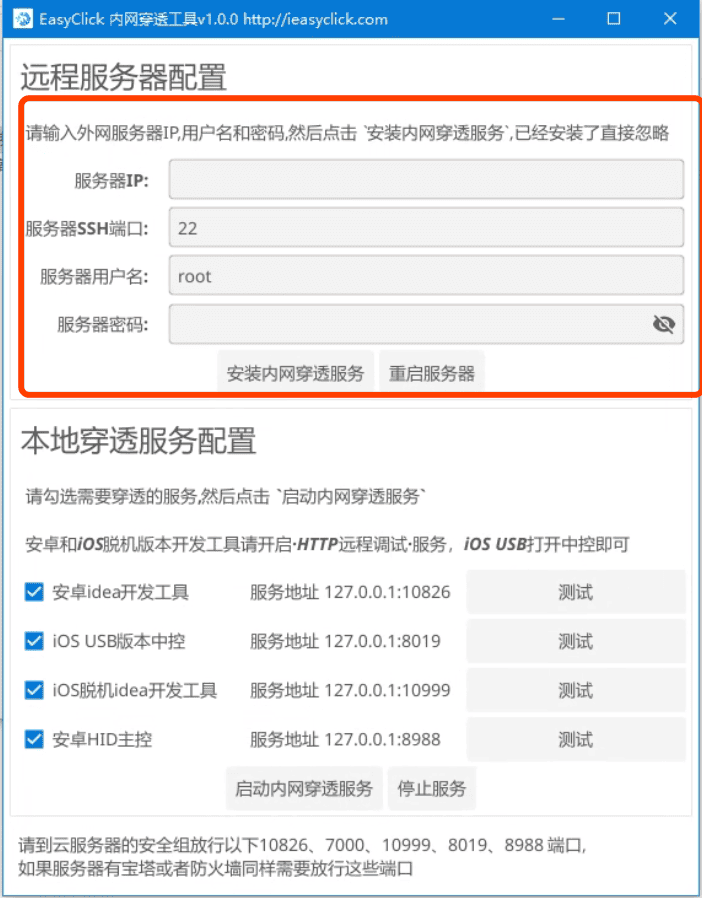
  • Enter the server IP, username, and password in the tool's remote server settings

  • Click Install intranet tunnel service and wait for completion
  • After success, restart the server

Open ports

  • If your server has a security group or firewall, open: 7000, 10826, 10999, 8019, 8988, 8028
  • Alibaba Cloud security group guide: link

Enable debug service

  • Android: in the EasyClick dev plugin, open HTTP remote debugging — do not change the port
  • iOS USB: open USB control center
  • iOS standalone: in the dev plugin, open HTTP remote debugging — do not change the port
  • HarmonyOS NEXT USB: open USB control center
  • HID control center: double-click the .exe to run

Start tunnel service

  • In EasyClick intranet tunnel remote debugging, click Start intranet tunnel service and wait until it succeeds

Connection URLs

  • Android: in EC App remote debugging, choose HTTP mode, enter server IP, port 10826, then connect
  • iOS USB: in the IDEA dev plugin, choose USB connection, enter http://server-IP:8019
  • iOS standalone: in EC App settings → remote debugging, enter server-IP:10999
  • HarmonyOS NEXT USB: in the IDEA dev plugin, choose USB connection, enter http://server-IP:8028
  • Android HID control center: set the control center address to http://server-IP:8988 in code
tip
  • If your HID control center has a Linux build, consider Linux networking to Windows — phones on Linux, Windows control center exposed via tunnel

Encrypt server info

  • To hide your server IP from clients, enter the IP, click Generate encrypted info, send the encrypted string to the client, and have them paste it in the encryption field instead of the IP
  • Remove the password when generating, or clients could operate your server