Overview
Project layout
- Open a folder in IDEA, then New Module:
-
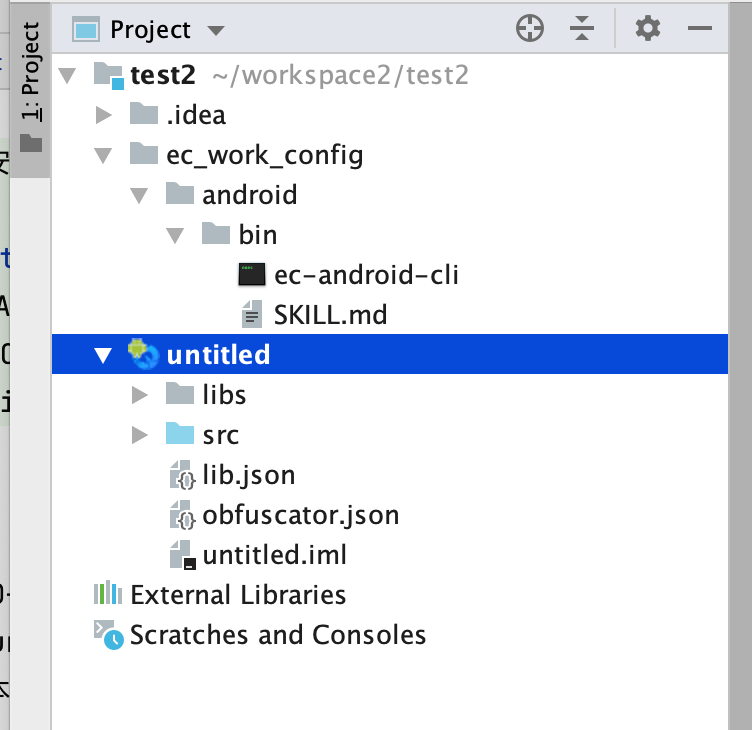
- If ec_work_config/android/bin is missing, close and reopen the project folder
- ec_work_config/android/bin holds EC Android build CLI and SKILL.md
Coding with Cursor
Open project
- In Cursor, open the project folder, not a single module
-
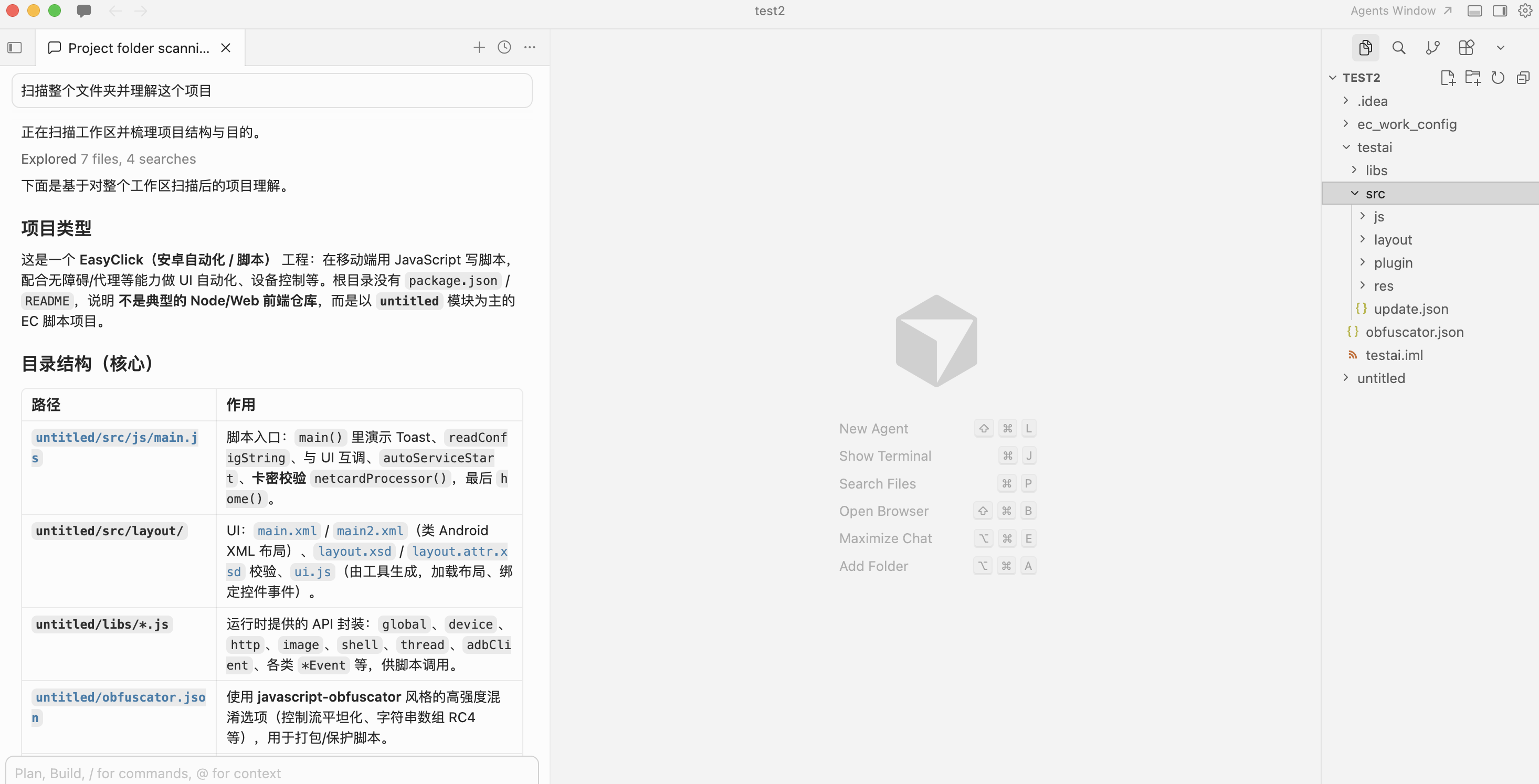
- Ask the AI to understand the project and scan structure + SKILL.md
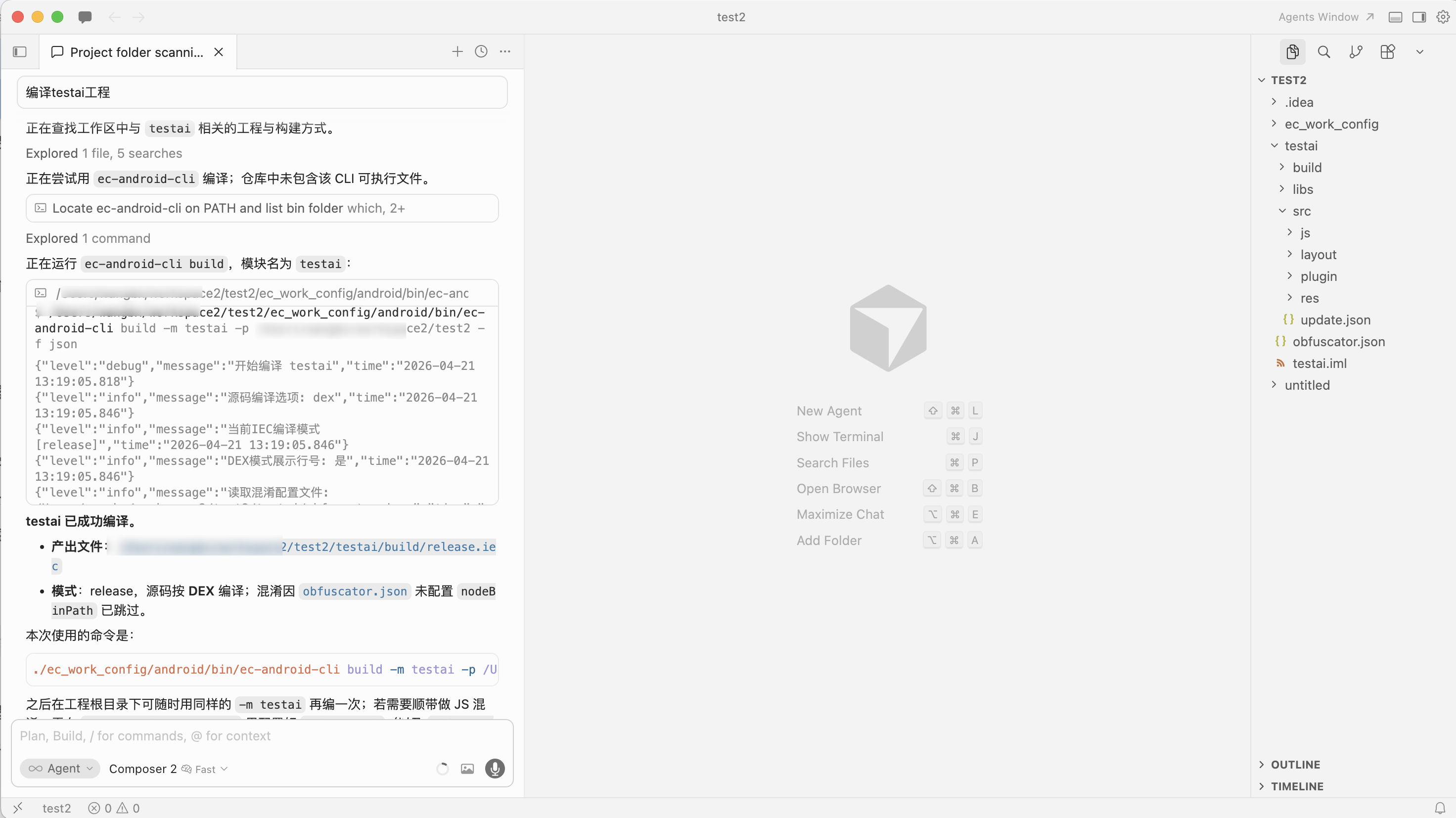
Build IEC
- Ask the AI to build, e.g. module
testai -
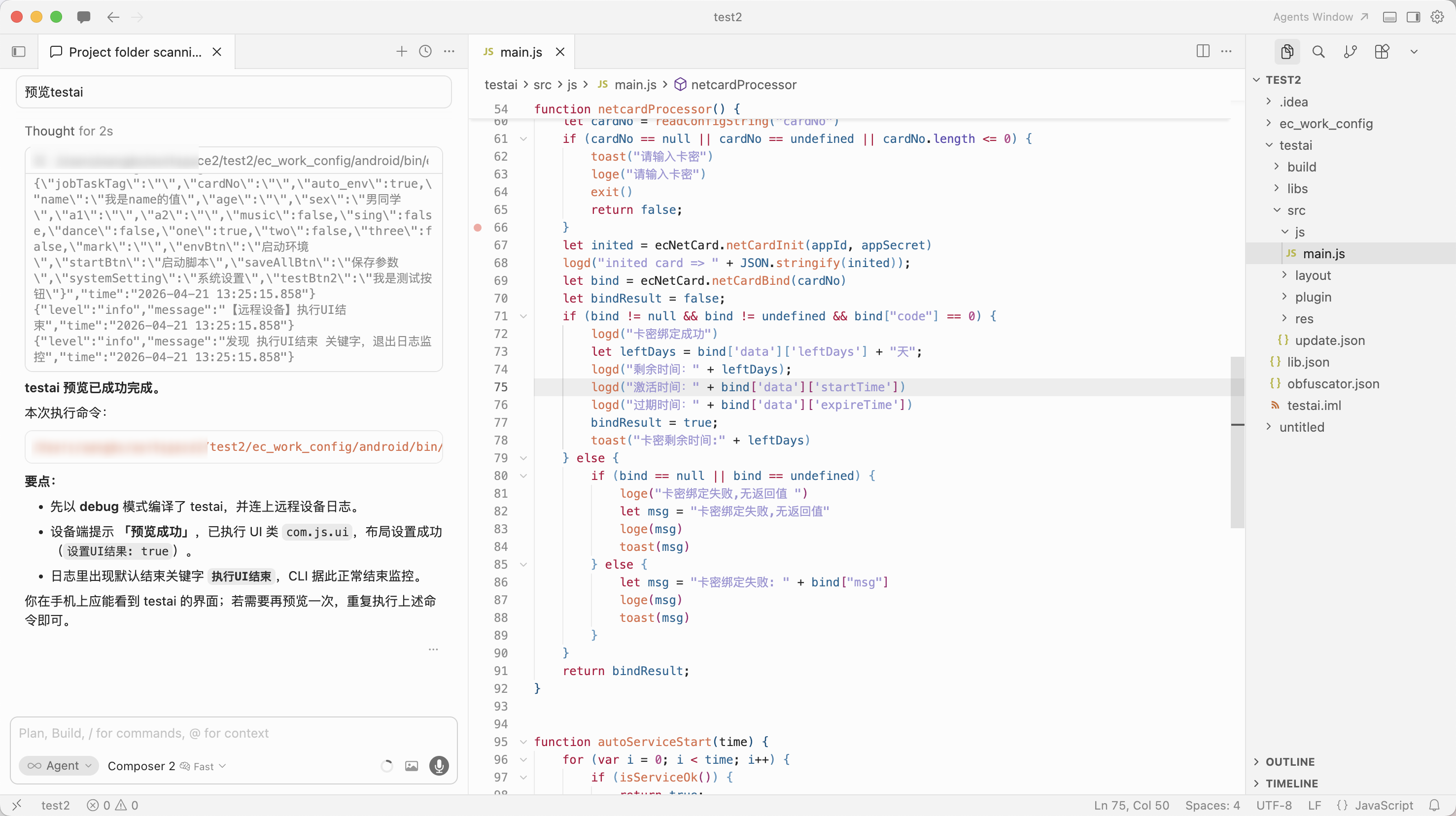
Preview project
- Requires a device connected in IDEA; otherwise you get a no-device error
- Ask the AI to preview, e.g.
testai -
Run project
- Requires a device connected in IDEA; otherwise you get a no-device error
- Ask the AI to run, e.g.
testai -
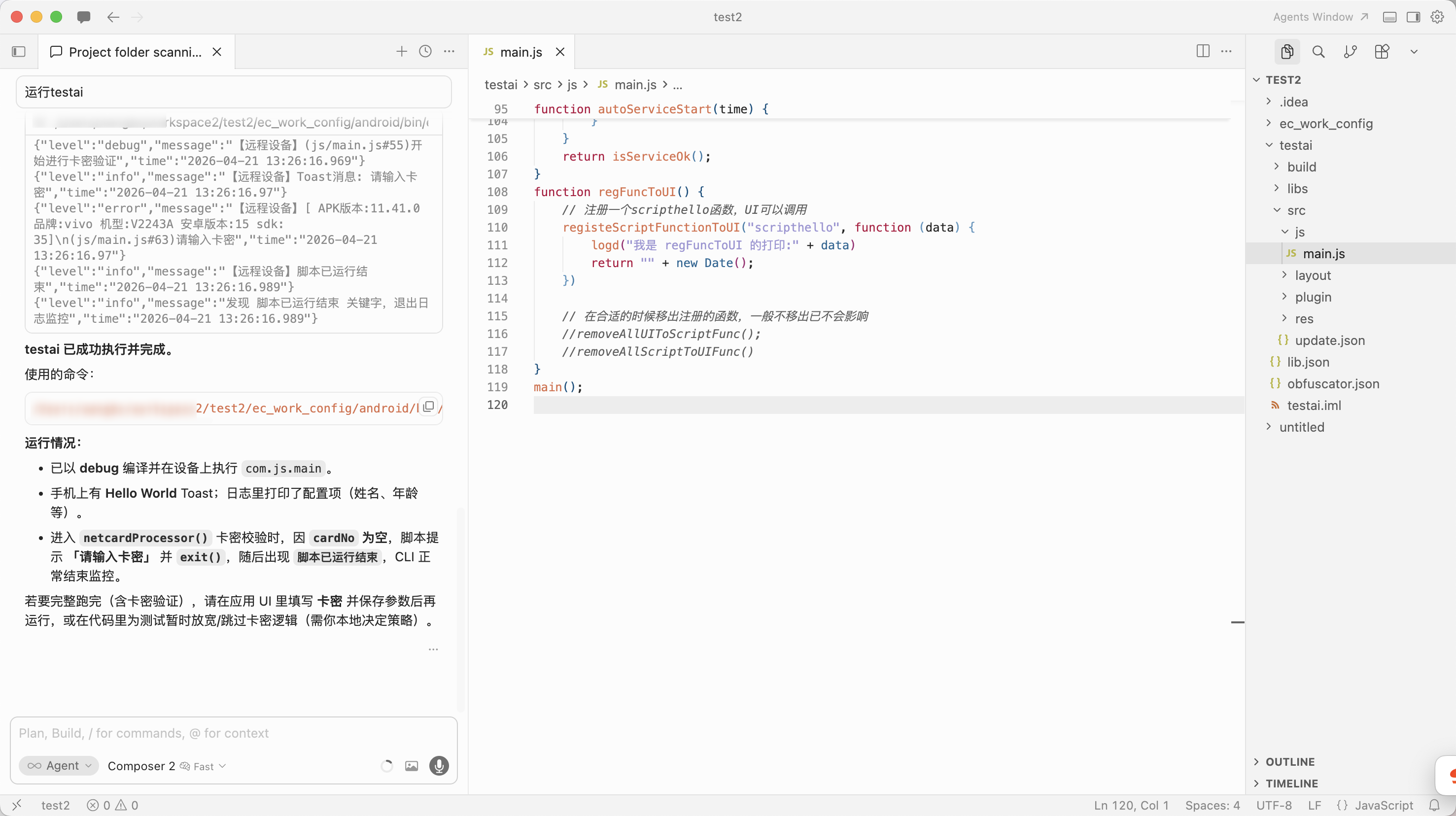
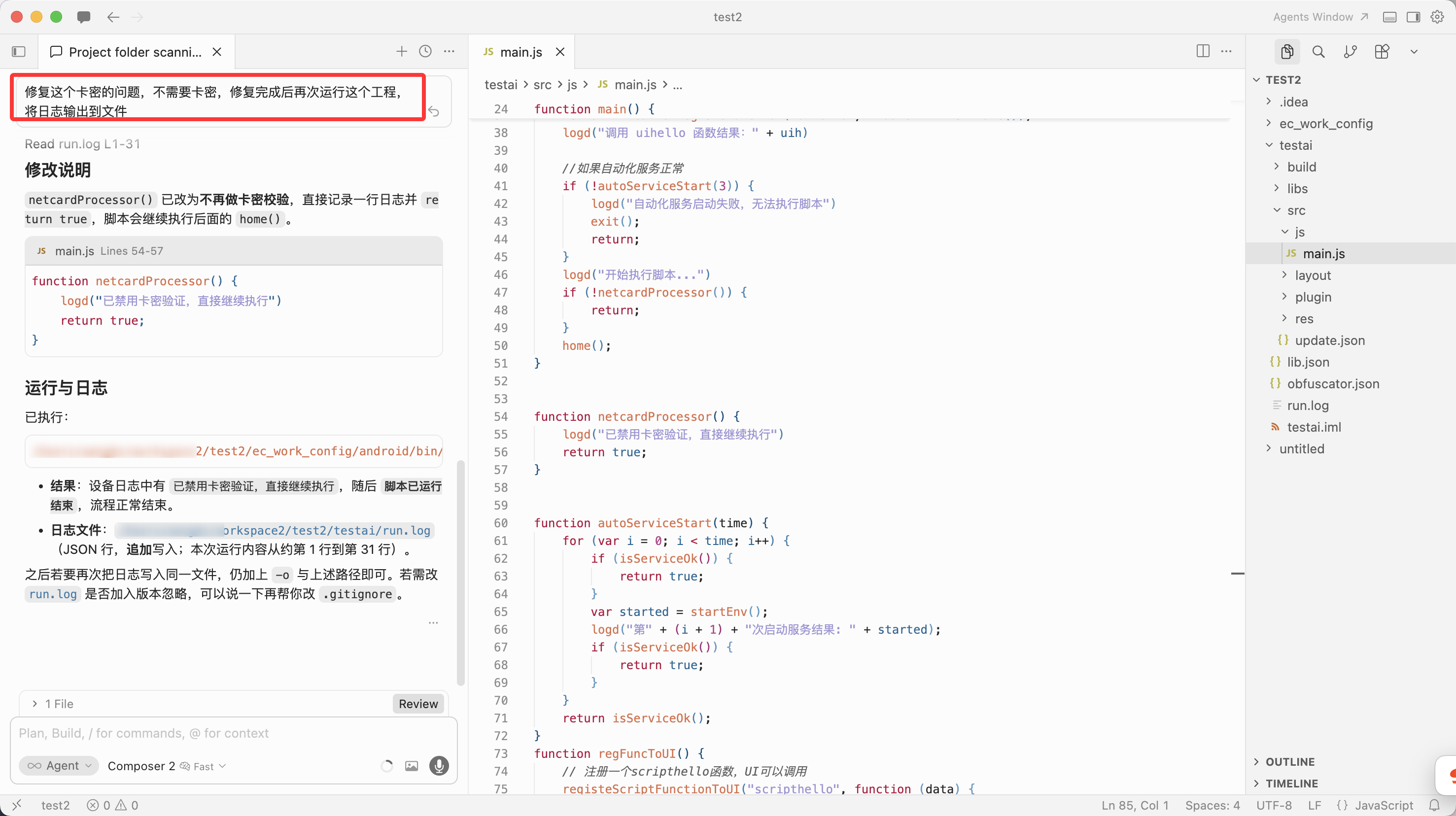
- If a license/key error appears, ask Cursor to fix it and run again
-
Feed docs to the AI
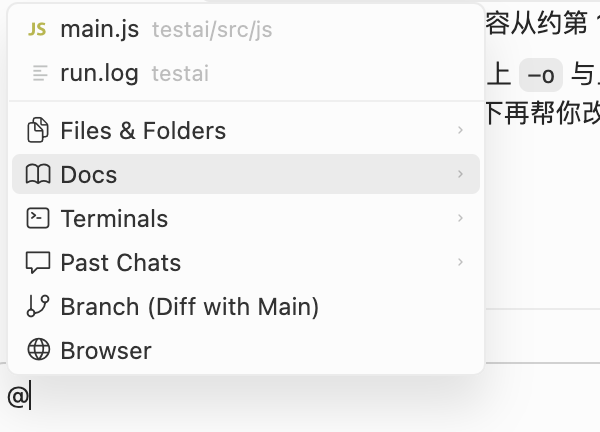
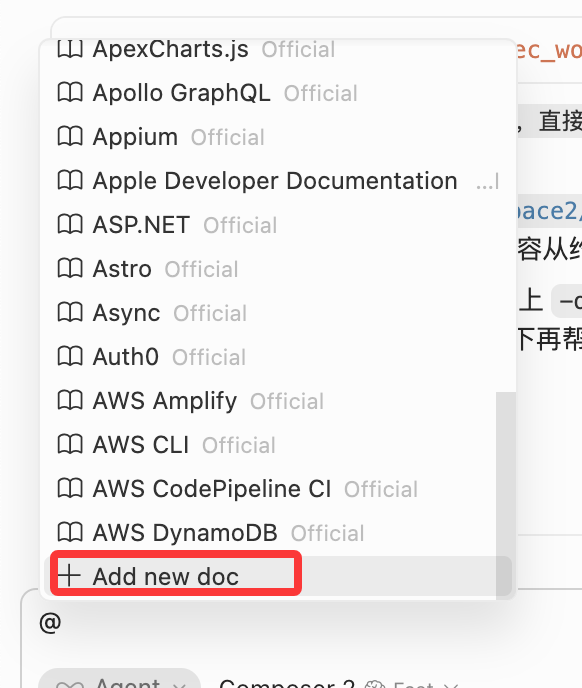
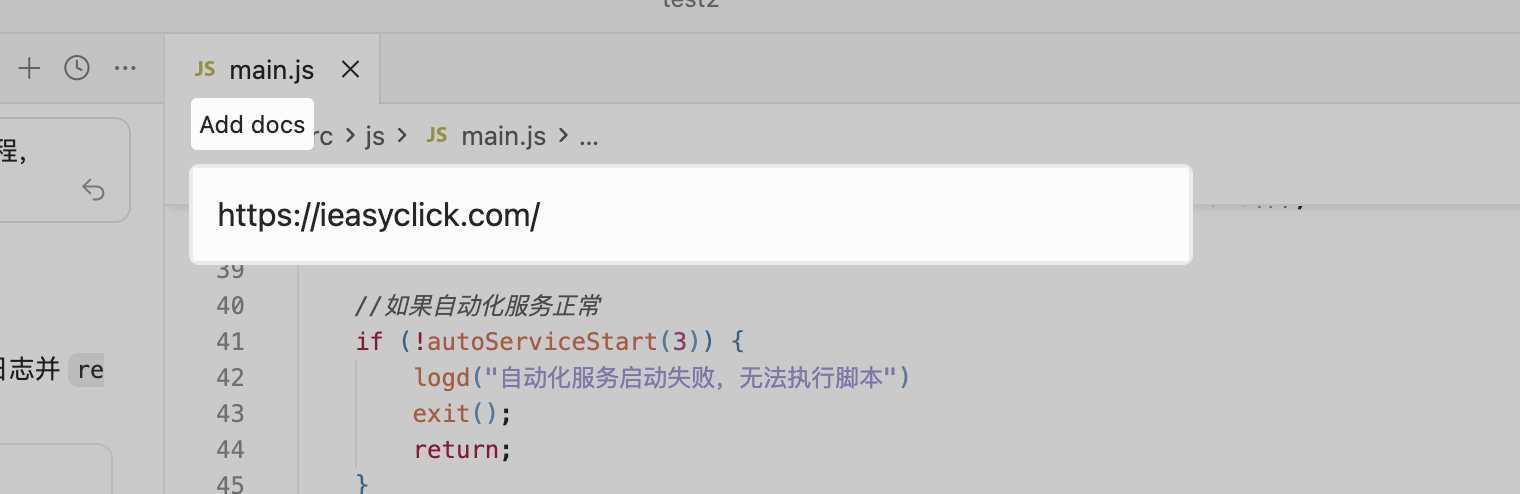
- In chat, type
@, choose Docs → Add new doc, add EC doc URLs for the AI to fetch - v12.1.0+ adds IDEA top menu → Install AI DOCS — one click installs all docs under the project; then generate prompt files for your AI platform yourself
More
- Auto-coding and log analysis — explore yourself; CLI commands describe what happened so the AI can act
CLI commands — SKILL.md
- The SKILL.md below is for the AI to ingest — you can skip reading it
---name: ec-android-clidescription: >- EasyClick ec-android-cli install prerequisites, subcommands, flags, and examples. Use when a user or Agent needs to run, script, or troubleshoot this CLI; no implementation internals.---
# ec-android-cli reference
## Prerequisites
- **IntelliJ IDEA** running with **EasyClick dev tools** plugin responsive.- **Module name** in CLI matches the IDEA script module name.- Multiple windows/projects: use **`-p`** with the **project root** path as opened in IDEA.
## Binary and help
- **Bundled binary** (repo root): **`ec_work_config/android/bin/ec-android-cli`** - From repo root: `./ec_work_config/android/bin/ec-android-cli -h` - Agents/scripts should prefer this path over global PATH. - Set log output format to JSON.- If installed globally: **`ec-android-cli`** (same program; rename locally if needed).- Help: `./ec_work_config/android/bin/ec-android-cli -h` (or `ec-android-cli -h` if on PATH)- Subcommand help: `./ec_work_config/android/bin/ec-android-cli <subcommand> -h`
## Subcommands
| Subcommand | Purpose ||-------------------|----------------------------|| `preview` | Preview project || `run` | Run project || `stop` | Stop current run || `build` | Build IEC || `capture-screen` | Screenshot (from IDEA-connected device; returns path) || `capture-node` | Capture UI nodes (UIX, XML) and return path || `ocr-local-image` | OCR local image and output result || `ocr-screen` | OCR current screen and output result || `test-image` | Template match test (local image or live screen) || `monitor` | Stream logs only (no `-m`) |
**Notes:** Except `monitor`, all subcommands require **`-m` (module name)**; `monitor` does not.
## Common flags (most subcommands except `monitor`)
| Flag | Meaning ||-----------------------------|--------------------------------------------------------------------------------------------------------------------------------------------------------------------------------------|| **`-m` / `--module`** | **Required.** IDEA module name. || **`-p` / `--project`** | Optional. Project root (same path as opened in IDEA). || **`-f` / `--format`** | Optional. Log line format: `text` or `json`; **default `json`**. || **`-o` / `--log`** | Optional. **Append** logs to the given file path. || **`-k` / `--stop-on`** | Optional. When log **contains** this substring, print a hint and **exit** (end log monitoring). For multiple OR conditions, join with **`|||`** (exit if any matches). || **`-w` / `--monitor-logs`** | Optional. `true` / `false`. **`preview` / `run` / `stop`**: omitting `-w` means **`true`** (follow logs until **Ctrl+C** or `-k` match). **`build`**: omitting `-w` means **`false`** (stop after the operation). Override with `-w true` / `-w false`. || **`-r` / `--random-log`** | Optional. `true` / `false`. When `true`, auto-generate a log file under **`ai_logs/`**; **cannot be used with `-o`**. |
**Constraints:** Optional flags must have **valid values**; **`-r` and `-o` are mutually exclusive**.
**`-k` multi-keyword (general):** All subcommands that support **`-k`** — **`preview` / `run` / `stop` / `build` / `monitor`** — accept **`|||`** for OR: monitoring ends when **any** substring appears.
**`preview` only:** If **`-k` / `--stop-on`** is omitted, default stop keyword is **`执行UI结束`**; if **`-w`** is omitted, default is **keep monitoring logs** (same as `-w true`).
**`run` only:** If **`-k`** is omitted, default stop keyword is **`脚本已运行结束`**; if **`-w`** is omitted, default is **keep monitoring logs** (same as `-w true`).
**`stop` only:** If **`-k`** is omitted, monitoring ends when log contains **`停止失败`**, **`停止运行成功`**, or **`无设备连接`** (**any** match); if **`-w`** is omitted, default is **keep monitoring logs** (same as `-w true`). Explicit **`-k`** overrides (still supports **`|||`** for OR).
**`build` (compile IEC) only:** If **`-k`** is omitted, monitoring ends when log contains **`release.iec`**, **`编译IEC成功`**, or **`编译失败`** (**any** match).
## `monitor` only
Log stream only; no `-m`, `-p`, or `-w`.
| Flag | Meaning ||---------------------------|--------------------------------|| **`-f` / `--format`** | Same as above: `text` or `json`, default `json`. || **`-o` / `--log`** | Same as above. || **`-k` / `--stop-on`** | Same as above. || **`-r` / `--random-log`** | Same as above (not with `-o`). |
## Logging habits
- Routine logs go to **stderr**; with **`-o`** or **`-r`**, also written to file.- Default log line format is **JSON** unless **`-f text`**.
## Examples
# Assume repo root; EC = ./ec_work_config/android/bin/ec-android-cliEC=./ec_work_config/android/bin/ec-android-cli$EC preview -m app$EC preview -m app -f json$EC run -m app -f json -o /tmp/easyclick.log$EC run -m app -r true$EC run -m app -w false$EC stop -m app$EC build -m app$EC capture-screen -m app$EC capture-node -m app -d /tmp/nodes$EC ocr-local-image -m app -i /tmp/a.png$EC ocr-screen -m app$EC test-image -m app -s /tmp/s.png$EC monitor$EC monitor -f text -o /tmp/monitor.log -k "完成"
Multi-project example:
./ec_work_config/android/bin/ec-android-cli run -m app -p /path/to/project/root
## `capture-screen`
- **Purpose**: Take a screenshot; outputs path on success.- **Common short flags**: - `-n`: `--only-network` - `-d`: `--dir`
EC=./ec_work_config/android/bin/ec-android-cli$EC capture-screen -m app$EC capture-screen -m app -n -d /tmp/shots
## `capture-node` (UIX nodes)
- **Purpose**: Capture UI nodes; outputs UIX file path on success.- **Common short flags**: - `-d`: `--dir`
EC=./ec_work_config/android/bin/ec-android-cli$EC capture-node -m app$EC capture-node -m app -d /tmp/nodes
## `ocr-local-image`
- **Purpose**: OCR a local image; outputs result string on success.- **Required**: `-i/--path` local image path- **Optional**: - `-t/--ocr-type`: `paddleOcrNcnnV5|paddleOcrOnnxV4|paddleOcrOnnxV5|ocrLite` (default `paddleOcrNcnnV5`) - `-P/--padding`: default `32` - `-X/--max-side-len`: default `640` - `-R/--release`: default `false`
EC=./ec_work_config/android/bin/ec-android-cli$EC ocr-local-image -m app -i /path/to/image.png$EC ocr-local-image -m app -i a.jpg -t paddleOcrOnnxV5 -P 48 -X 960 -R
## `ocr-screen`
- **Purpose**: OCR current screen; outputs result string on success.- **Optional** (same as `ocr-local-image`, no `--path`): - `-t/--ocr-type` (default `paddleOcrNcnnV5`) - `-P/--padding` (default `32`) - `-X/--max-side-len` (default `640`) - `-R/--release` (default `false`)
EC=./ec_work_config/android/bin/ec-android-cli$EC ocr-screen -m app$EC ocr-screen -m app -t paddleOcrOnnxV5 -P 48 -X 960 -R
## `test-image`
- **Purpose**: Template match test; outputs result string on success.- **Required**: `-s/--small-image-path` template image path- **Optional** (all string values): - `-T/--test-type`: `1` local image test; `2` live screen test (default `2`). No `--big-image-path` when `test-type=2` - `-B/--big-image-path`: large image path (only when `test-type=1`) - `-F/--func`: `findImageByColor|findImage|matchTemplate` (default `findImage`) - `-M/--method`: template match method (default `5`) - `-g/--range`: default `0,0,0,0` - `-l/--limit`: default `1` - `-L/--max-level`: default `-1` - `-E/--weak-threshold`: default `0.7` - `-H/--threshold`: default `0.8` - `-C/--opencv-mat`: `1` no; `2` yes (default `1`)
EC=./ec_work_config/android/bin/ec-android-cli$EC test-image -m app -s /tmp/s.png$EC test-image -m app -T 1 -s s.png -B b.png -F matchTemplate -M 5$EC test-image -m app -F findImage -g 0,0,0,0 -l 1 -E 0.7 -H 0.8EasyClick development expert (EC scripts & API quick reference)
EasyClick is an Android test automation and script development tool with four run modes: accessibility, agent, Bluetooth HID, and OTG HID.
Run modes:
- Accessibility: Uses system accessibility service; full feature set
- Agent: Connects to PC or agent service; full feature set
- Bluetooth HID: Operates via Bluetooth HID device; image/color, OCR, and Bluetooth tap/swipe only
- OTG HID: Operates via OTG HID device; image/color, OCR, and OTG tap/swipe only
API lookup:
- All APIs are in corresponding JS files under the project
libsdirectory - Basic functions:
basic.js; image:image.js; OCR: OCR section inimage.js - Node info:
nodeimagedirectory - Screenshot info:
clorimagedirectory - CLI: see Section 1 of this doc, ec-android-cli reference (source in repo:
cli_ai) - Read function header comments in each file for usage and parameters
I. Core modules
1.1 Basic functions
logd(msg)/logi(msg)/logw(msg)/loge(msg) // Log output (blue/green/yellow/red)toast(msg) // Toast messagesleep(ms) // Sleep (milliseconds)exit() // Exit scriptstartEnv() // Start accessibility serviceisServiceOk() // Check service status1.2 Selectors
text(str)/textMatch(reg) // Text contains / regextextStartsWith(str)/textEndsWith(str) // Text starts/ends withdesc(str)/descMatch(reg) // Description contains / regexid(str)/idMatch(reg) // ID contains / regexclz(str)/clzMatch(reg) // Class name contains / regexpkg(str)/pkgMatch(reg) // Package name contains / regexbounds(l,t,r,b) // Boundsselector.and(s2)/selector.or(s2) // AND / OR conditions1.3 Node operations
// Get nodesselector.getOneNodeInfo(timeout) // Get one nodeselector.getNodeInfo(timeout) // Get all matching nodesselector.has() // Check existenceselector.waitExistNode(timeout) // Wait for node// Node propertiesnode.text/node.desc/node.id/node.clz/node.pkg // Text/desc/ID/class/packagenode.bounds // Bounds {l,t,r,b}node.clickable/node.visible/node.childCount // Clickable/visible/child count// Node actionsnode.click()/node.longClick() // Click/long pressnode.inputText(content)/node.clearText() // Input/clear textnode.scrollForward()/node.scrollBackward()// Scroll forward/backnode.parent()/node.child(index) // Parent/child node1.4 Global actions
clickPoint(x,y)/longClickPoint(x,y)/doubleClickPoint(x,y) // Click/long press/double tapswipeToPoint(x1,y1,x2,y2,duration) // Swipe to coordinatesswipeUp()/swipeDown()/swipeLeft()/swipeRight() // Swipe up/down/left/righttouchDown(x,y)/touchMove(x,y)/touchUp(x,y)// Touch controlinputText(selectors,content) // Input textclearTextField(selectors) // Clear textgetOneNodeInfo(selectors,timeout) // Get one nodehas(selectors)/waitExistNode(selectors,timeout) // Check/wait for nodedumpXml() // Get node XML1.5 Device info
device.getScreenWidth()/getScreenHeight() // Screen width/heightdevice.getIMEI()/getBrand()/getModel() // IMEI/brand/modeldevice.getAndroidId()/getMacAddress() // Android ID/MACdevice.getBrightness()/setBrightness(b) // Get/set brightnessdevice.getBattery() // Battery leveldevice.vibrate(millis) // Vibrate1.6 Utilities
utils.openApp(packageName) // Open apputils.openAppByName(appName) // Open by nameutils.isAppExist(packageName) // Check if installedutils.getAppVersionCode(packageName) // Get version codeutils.showLogWindow()/hideLogWindow() // Show/hide log windowII. Image processing
image.requestScreenCapture(timeout,type) // Request screenshot permissionimage.captureScreen() // Capture screenimage.captureToFile(retry,x,y,ex,ey,path) // Save screenshot to fileimage.readImage(path)/saveImage(img,path) // Read/save imageimage.findImageEx(template,x,y,ex,ey,weakThresh,thresh,limit,method) // Find imageimage.findColorEx(color,thresh,x,y,ex,ey,limit,orz) // Find colorimage.findMultiColorEx(firstColor,points,thresh,x,y,ex,ey,limit,orz) // Multi-point colorimg.getWidth()/getHeight() // Width/heightimg.pixel(x,y) // Pixel colorimg.recycle() // Release imageIII. OCR
let ocrInst=ocr.newOcr()ocrInst.initOcr({"type":"paddleOcrNcnnV5","numThread":2,"padding":32,"maxSideLen":640})let results=ocrInst.ocrImage(img,timeout,map) // Returns [{label,confidence,x,y,width,height}]ocrInst.ocrFile(path,timeout,map) // OCR image fileocrInst.releaseAll() // Release resourcesIV. File I/O
file.readFile(path)/writeFile(data,path) // Read/writefile.copyFile(src,dest)/moveFile(src,dest)// Copy/movefile.deleteFile(path) // Deletefile.exists(path)/isFile(path)/isDir(path)// Exists/file/directoryfile.create(path)/listDir(path) // Create/list directoryV. HTTP
http.httpGetDefault(url,timeout,headers) // GEThttp.httpPost(url,params,files,timeout,headers) // POSThttp.postJSON(url,json,timeout,headers) // POST JSONhttp.downloadFile(remoteUrl,file,timeout,headers) // Download fileVI. Database
sqlite.connectOrCreateDb(dbName) // Connect/create DBsqlite.createTable(tableName,columns) // Create tablesqlite.insert(tableName,map) // Insertsqlite.update(tableName,map,where) // Updatesqlite.query(sql)/execSql(sql) // Query/execute SQLsqlite.close() // Close DBVII. Multithreading
thread.execAsync(runnable) // Run async; returns thread IDthread.cancelThread(threadId)/stopAll() // Cancel thread/allsetTimeout(func,timeout) // Delayed runsetInterval(func,interval) // Periodic runVIII. UI
ui.layout(name,content) // Load XML layoutui.findViewById(id) // Find view by IDui.setVisibility(view,visibility) // Set visibilityui.setText(view,text)/getText(view) // Set/get textui.setEvent(view,eventType,callback) // Event listenerui.putShareData(key,value)/getShareData(key) // Shared data get/setui.customDialog(params,view,bind,dismiss) // Custom dialogIX. Shell
shell.installApp(path) // Install APKshell.uninstallApp(packageName) // Uninstall appshell.stopApp(packageName) // Stop appshell.execCommand(command) // Run shell commandshell.sudo(command) // Run root commandX. HID module
// Bluetooth HIDbleEvent.startConnect(name,save,timeout) // Connect Bluetooth devicebleEvent.isConnected() // Connected?bleEvent.clickPoint(x,y)/swipe(x0,y0,x1,y1,duration) // Tap/swipebleEvent.home()/back() // Home/back// OTG HIDotgEvent.init()/connectFirst() // Init/connectotgEvent.isConnected() // Connected?otgEvent.clickPoint(x,y)/swipe(x0,y0,x1,y1,duration) // Tap/swipeXI. Object extensions
// Pointpoint.click()/longClick()/doubleClick() // Click/long press/double tap// Rectrect.click()/clickRandom() // Click center/random point// Stringstr.contains(s)/replaceAll(s1,s2)/trim()/toInt() // Contains/replace/trim/to intXII. Code templates
// Start environmentfunction main(){if(!autoServiceStart(3)){loge("Service start failed");return;}}function autoServiceStart(time){for(let i=0;i<time;i++){if(isServiceOk())return true;startEnv();sleep(1000);}return isServiceOk();}main();// Find and clicklet node=text("Recommended").getOneNodeInfo(0);if(node)node.click();else loge("Not found");// Swipelet w=device.getScreenWidth(),h=device.getScreenHeight();swipeToPoint(w/2,h*0.8,w/2,h*0.2,500);// OCRlet ocrInst=ocr.newOcr();ocrInst.initOcr({"type":"paddleOcrNcnnV5","numThread":2,"padding":32,"maxSideLen":640});let img=image.captureScreen();let results=ocrInst.ocrImage(img,5000,null);if(results)for(let i=0;i<results.length;i++)logd(results[i].label);ocrInst.releaseAll();