PPOCR-ONNX Usage
tip
- This OCR product is free
- Based on PaddleOCR; supports PPOCR-v4 and PPOCR-v5 models. Currently runs on Windows
- Provides OCR HTTP API for EC Android, iOS USB, iOS standalone, and HarmonyOS Next
Download Software
- Download from any link in the software download area: Software Download Area
- In cloud drive
Ocr Resourcesfolder, downloadppocr-windows-x64zip, extract — path must not contain Chinese or special characters
Software Usage
- Double-click
ppocr-monitor.exe— monitors OCR process and restarts it if it exits
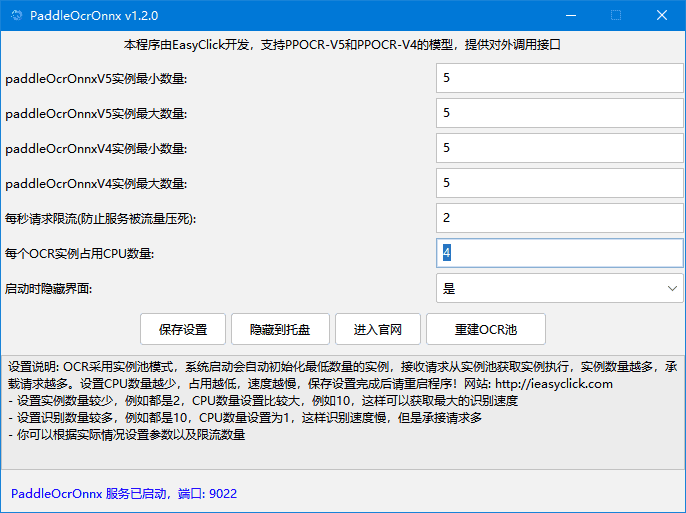
- After opening, bottom shows port and server status
- OCR instance pool mode for efficiency and concurrency
- paddleOcrOnnxV5 min instances — minimum v5 model instances
- paddleOcrOnnxV5 max instances — v5 instance cap
- v4 instance counts work similarly
- Requests per second limit — adjust based on OCR latency
- CPUs per OCR instance — higher = faster OCR, more CPU; keep CPUs × max instances ≤ total CPU cores or you may hit 100% CPU
- Save settings and restart software
- Rebuild OCR pool — release old instances and recreate; frees previous memory
- Hide on startup — run in background/tray
API Calls
- Built-in HTTP API, default port 9022
- Upload image file: http://127.0.0.1:9022/devapi/ocrOnnxFile
- POST JSON base64: http://127.0.0.1:9022/devapi/ocrOnnxBase64
- For LAN, replace 127.0.0.1 with server PC IP
- For public internet, deploy to public server or use frp — replace 127.0.0.1 with public IP
ocrOnnxFile Example
- EC Android example; iOS and HarmonyOS Next use the same request pattern
function test_http_ppocr() {
 if (!startEnv()) {
 loge("Automation failed to start, exiting script")
 exit()
 }
 if (!image.requestScreenCapture(10000, 0)) {
 loge("Screenshot permission failed — check background popup, overlay, etc.")
 exit()
 }
 // Wait at least 1s after permission (more on slow devices) before screenshot
 sleep(1000)

 for (let i = 0; i < 1; i++) {
 let img = image.captureFullScreenEx()
 if (!img) {
 loge("Screenshot failed")
 sleep(1000)
 continue
 }
 // paddleOcrOnnxV5 = PPOCR-V5, paddleOcrOnnxV4 = PPOCR-V4
 let ocrType = "paddleOcrOnnxV5";
 // padding — white border around image to improve recognition; default 10
 let padding = 50;
 // maxSideLen — if max edge > maxSideLen, scale down proportionally; default 0
 let maxSideLen = 0;
 try {

 let url = `http://192.168.2.19:9022/devapi/ocrOnnxFile?ocrType=${ocrType}&padding=${padding}&maxSideLen=${maxSideLen}`
 console.log(`request url ${url}`)
 image.saveTo(img, "/sdcard/tb.png")
 let file = {"file": "/sdcard/tb.png"}
 console.time(1)
 let result = http.httpPost(url, {}, file, 20 * 1000, {})
 logd("Request time: {} ms", console.timeEnd(1))
 if (!result) {
 logw("No recognition result")
 sleep(1000)
 continue
 }
 logd("OCR result-> " + result)
 result = JSON.parse(result).data;
 for (let i = 0; i < result.length; i++) {
 let value = result[i]
 logd("Text: " + value.label+ " confidence: "+value.confidence + " x: " + value.x + " y: " + value.y + " width: " + value.width + " height: " + value.height)
 }
 sleep(1000)
 } catch (e) {
 logd(e)
 } finally {
 image.recycle(img)
 }
 }
 }

 test_http_ppocr()
ocrOnnxBase64 Example
function test_http_ppocr_base() {

 if (!startEnv()) {
 loge("Automation failed to start, exiting script")
 exit()
 }
 if (!image.requestScreenCapture(10000, 0)) {
 loge("Screenshot permission failed — check background popup, overlay, etc.")
 exit()
 }
 sleep(1000)

 for (let i = 0; i < 1; i++) {
 let img = image.captureFullScreenEx()
 if (!img) {
 loge("Screenshot failed")
 sleep(1000)
 continue
 }
 let ocrType = "paddleOcrOnnxV5";
 let padding = 50;
 let maxSideLen = 0;
 try {

 let url = `http://192.168.2.19:9022/devapi/ocrOnnxBase64`
 console.log(`request url ${url}`)
 let base = image.toBase64(img)
 let data = {
 "ocrType":ocrType,
 "padding":padding,
 "maxSideLen":maxSideLen,
 "data":base,
 }
 console.time(1)
 let result = http.postJSON(url, data, 20 * 1000, {})
 logd("Request time: {} ms", console.timeEnd(1))
 if (!result) {
 logw("No recognition result")
 sleep(1000)
 continue
 }
 logd("OCR result-> " + result)
 result = JSON.parse(result).data;
 for (let i = 0; i < result.length; i++) {
 let value = result[i]
 logd("Text: " + value.label+ " confidence: "+value.confidence + " x: " + value.x + " y: " + value.y + " width: " + value.width + " height: " + value.height)
 }
 sleep(1000)
 } catch (e) {
 logd(e)
 } finally {
 image.recycle(img)
 }
 }
}
test_http_ppocr_base();
FAQ
- ppocr crashes on open
- Install VC runtime from cloud drive, restart PC
- Slow recognition
- Increase CPUs per OCR instance, reduce instance count for fastest speed
- High memory usage
- Reduce OCR instance count, or add RAM/CPU