Overview
Configure MCP (CLI optional)
If you prefer not to use the CLI, configure an MCP server in Cursor (or similar AI IDEs). The EasyClick Android IDEA plugin exposes preview, run, screenshot, OCR, node capture, and more.
Prerequisite: IntelliJ IDEA is running with an EasyClick Android project open (plugin loaded).
Add this to Cursor MCP config (e.g. user mcp.json):
{ "mcpServers": { "easyclick-android": { "url": "http://127.0.0.1:16522/mcp" } }}Default URL: http://127.0.0.1:16522/mcp. If the port is busy, the plugin tries subsequent ports starting from 16522.
Android API docs live under alldocs/docs/ in the project (alldocs/docs/funcs/ for API reference). Do not mix with alldocs/hmdocs/ (Harmony) or iOS docs. The CLI (ec-android-cli) still works; MCP does not replace it.
Project layout
- Open a folder in IDEA, then New Module:
-
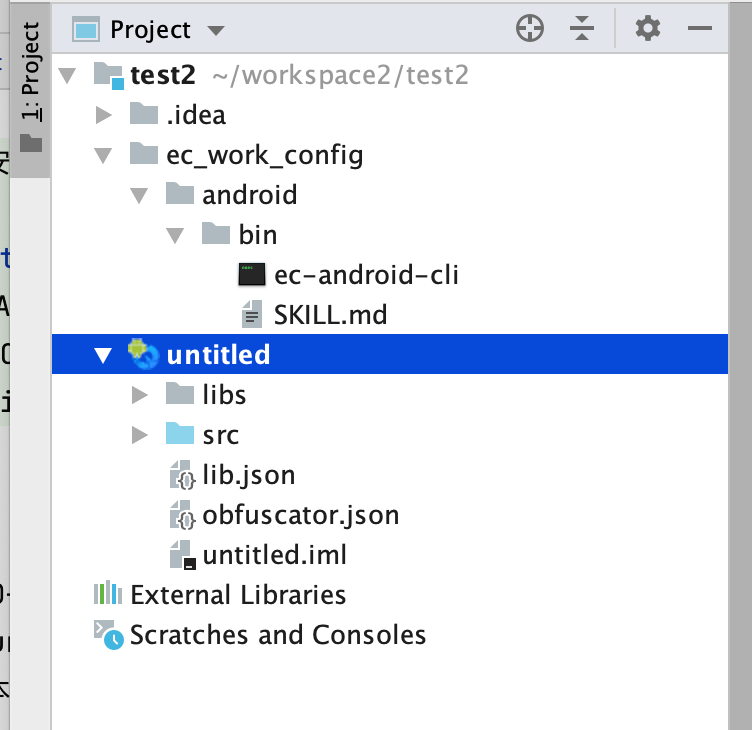
- If ec_work_config/android/bin is missing, close and reopen the project folder
- ec_work_config/android/bin holds EC Android build CLI and SKILL.md
Coding with Cursor
Open project
- In Cursor, open the project folder, not a single module
-
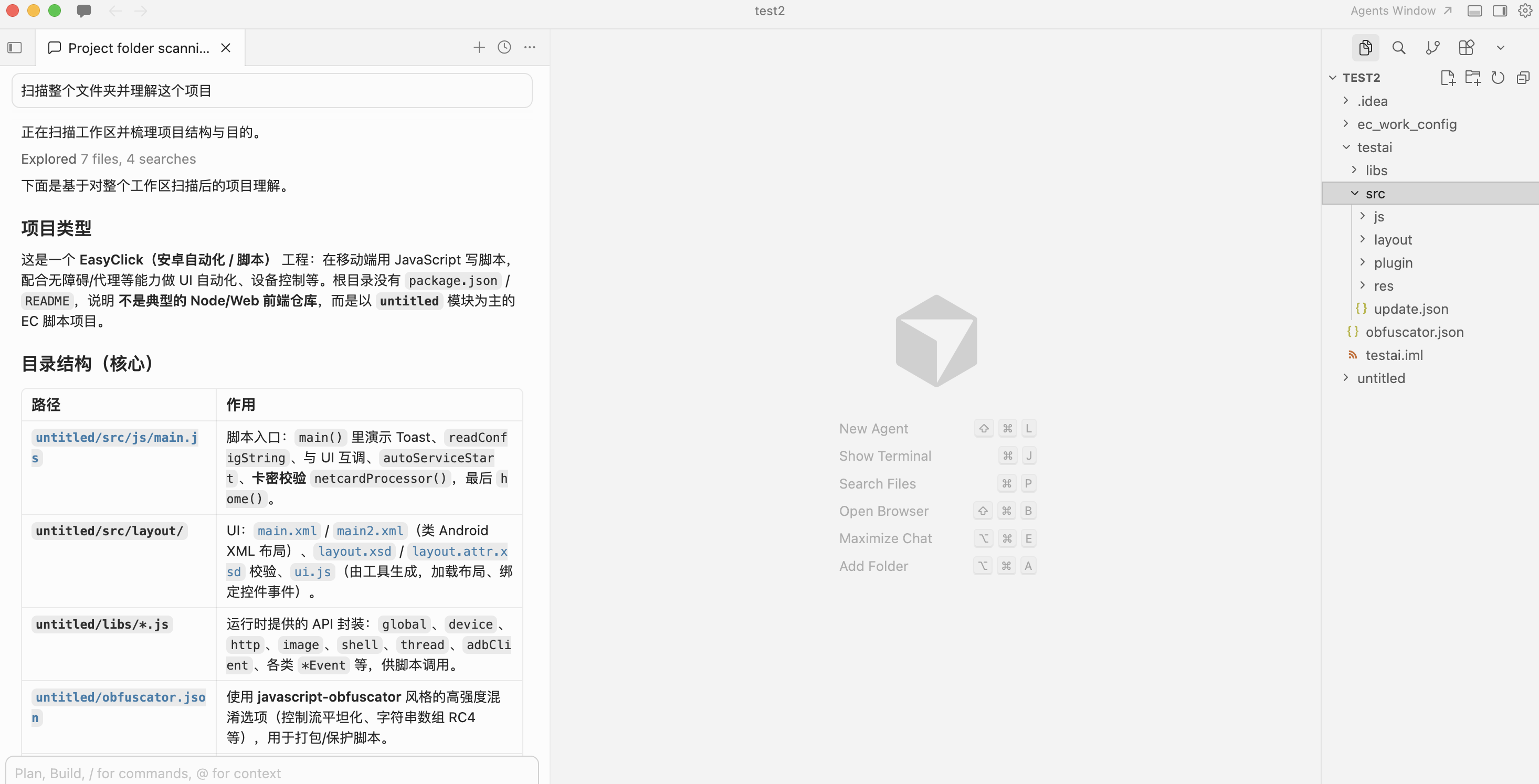
- Ask the AI to understand the project and scan structure + SKILL.md
Build IEC
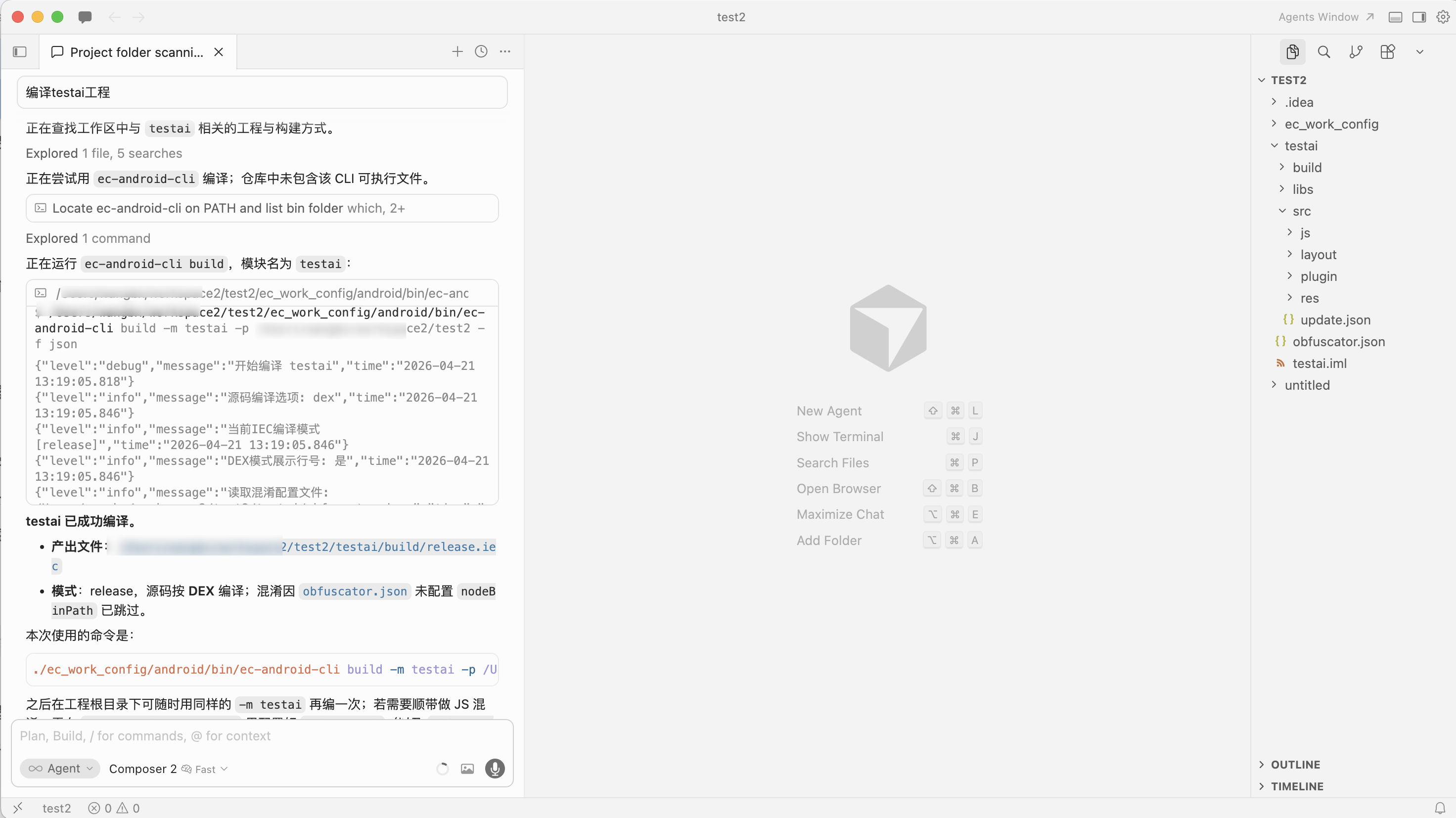
- Ask the AI to build, e.g. module
testai -
Preview project
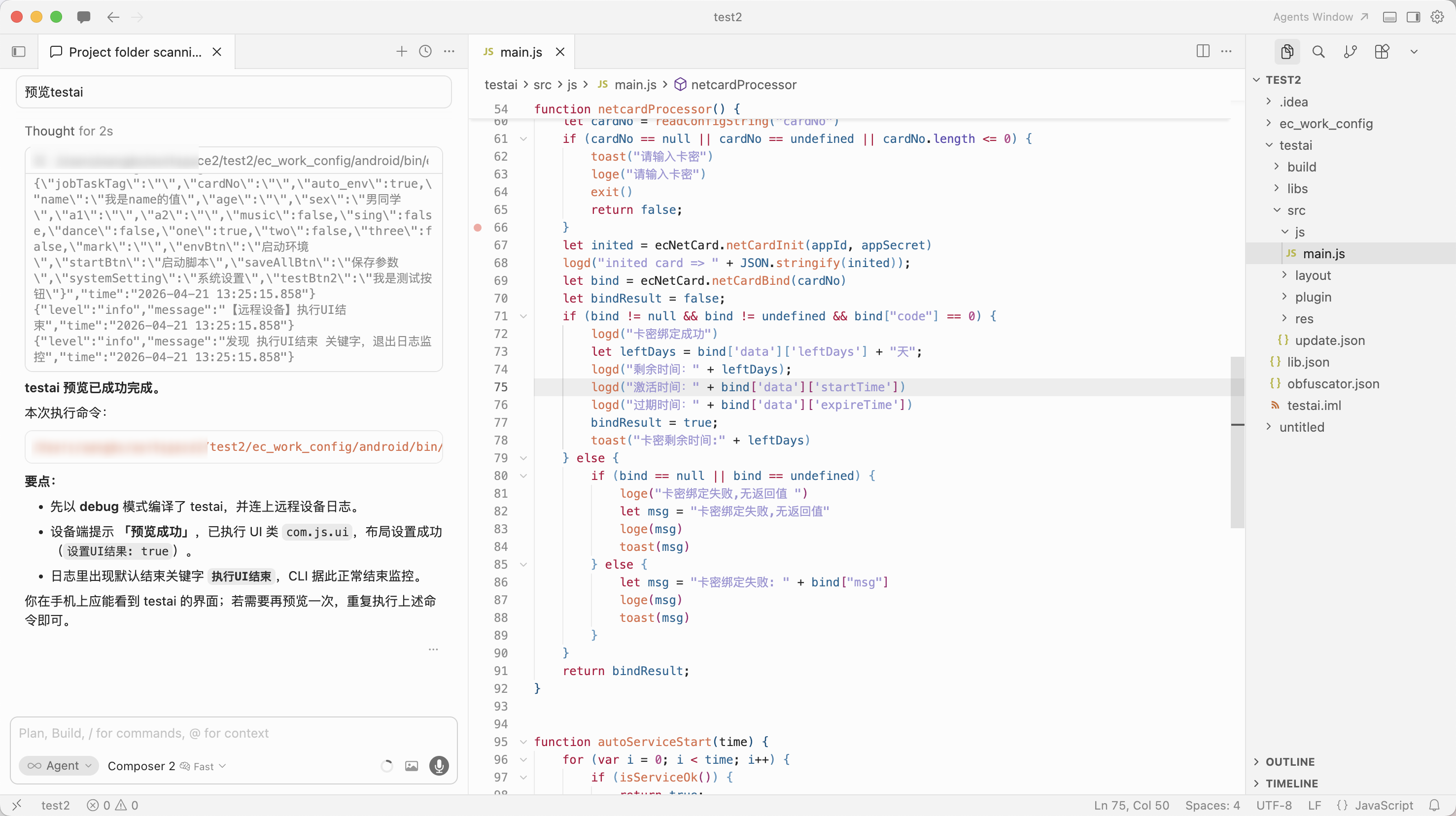
- Requires a device connected in IDEA; otherwise you get a no-device error
- Ask the AI to preview, e.g.
testai -
Run project
- Requires a device connected in IDEA; otherwise you get a no-device error
- Ask the AI to run, e.g.
testai -
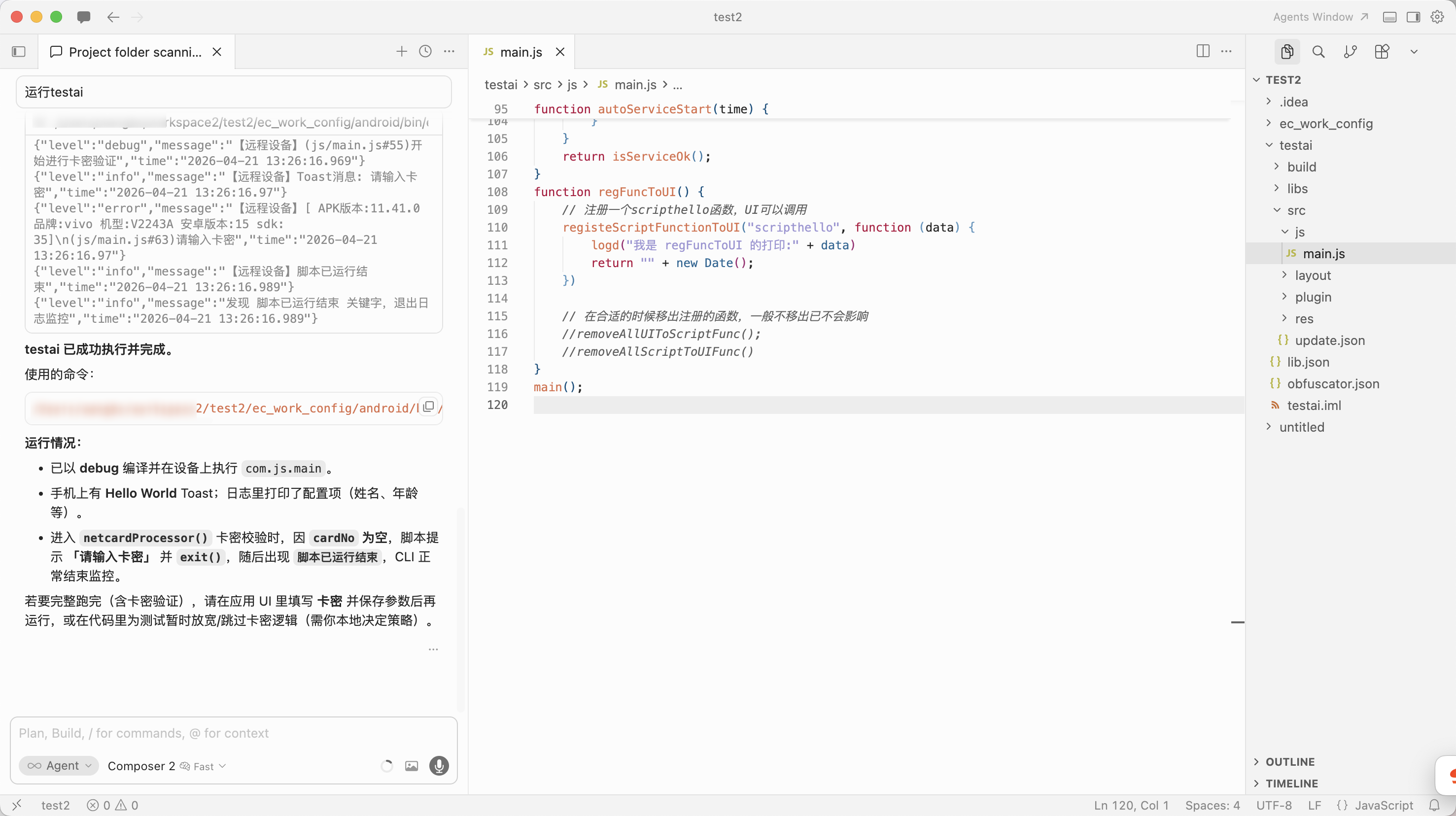
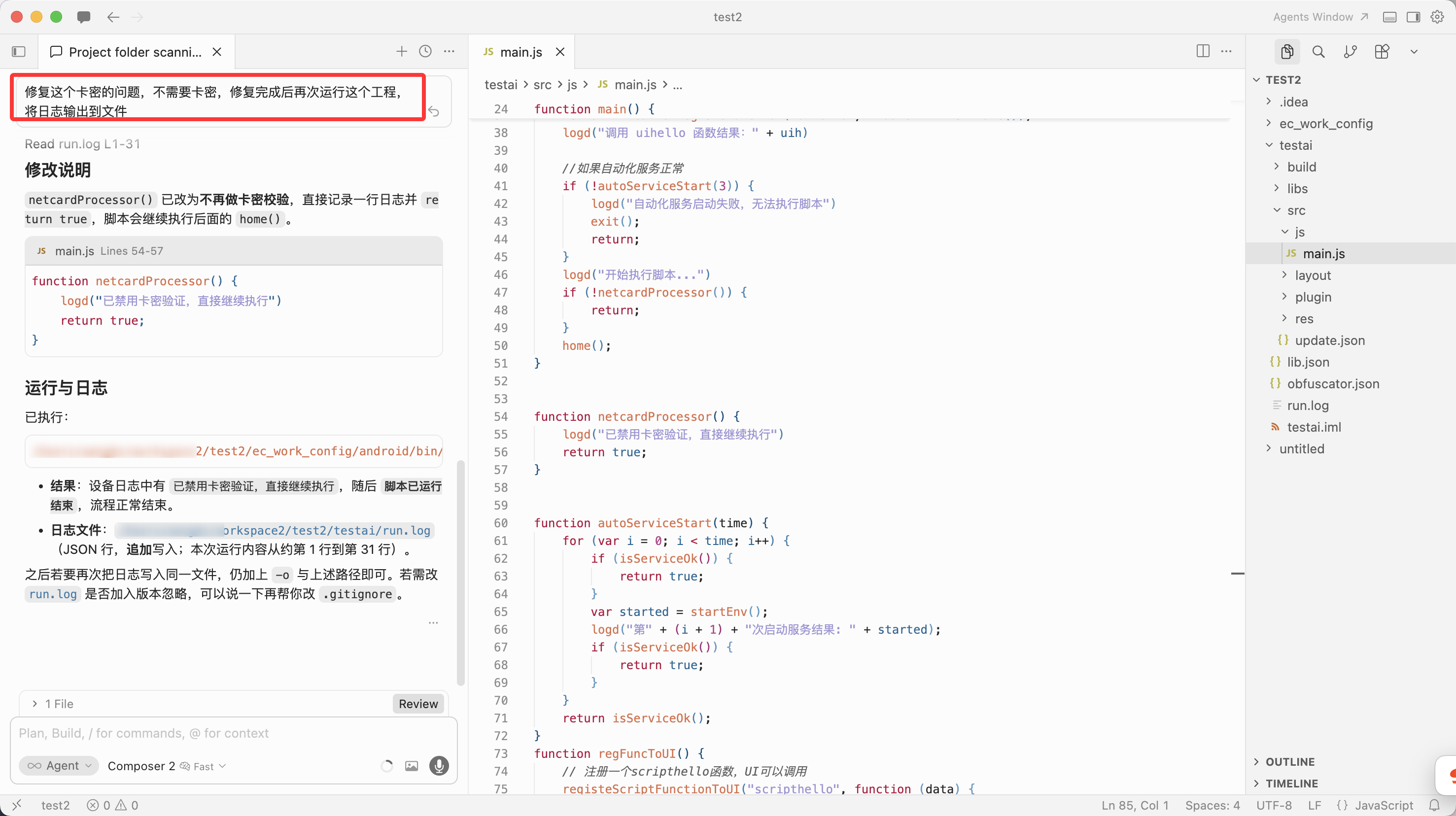
- If a license/key error appears, ask Cursor to fix it and run again
-
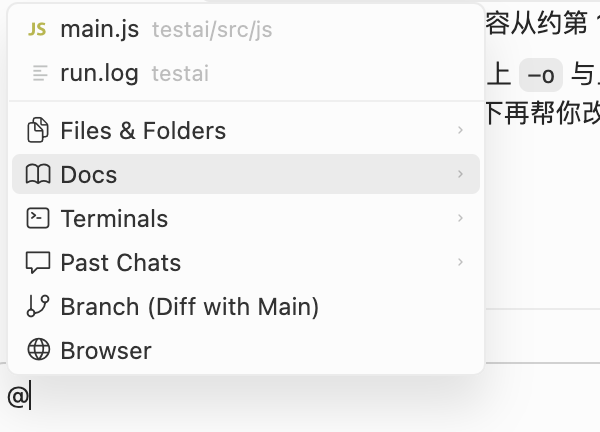
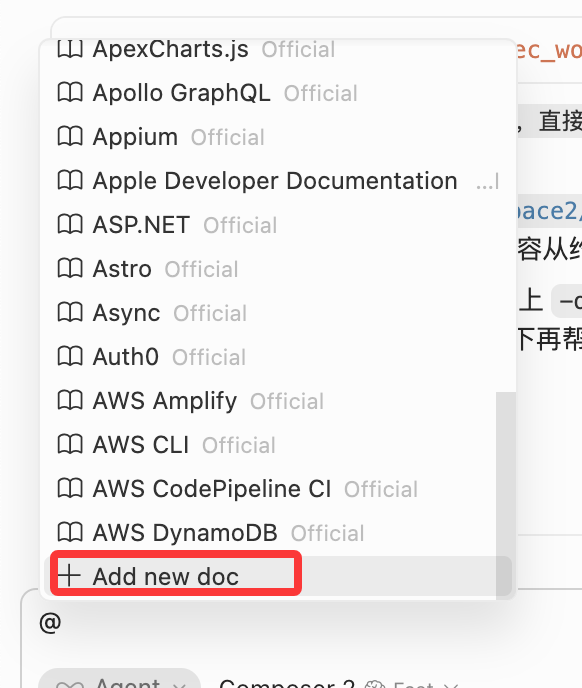
Feed docs to the AI
- In chat, type
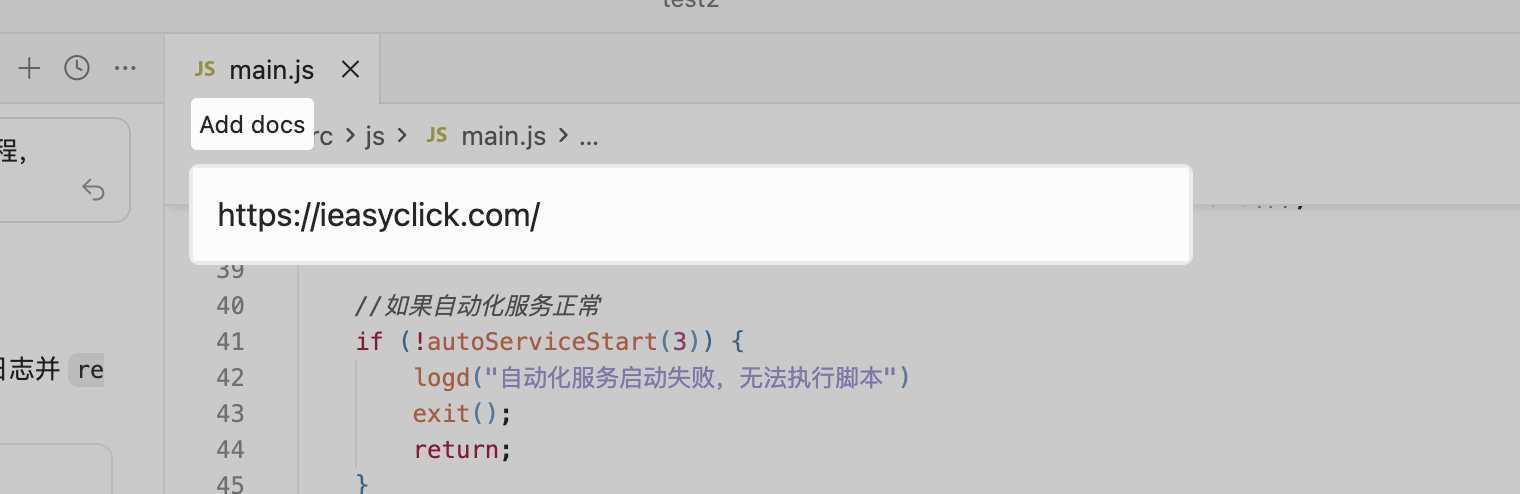
@, choose Docs → Add new doc, add EC doc URLs for the AI to fetch - v12.1.0+ adds IDEA top menu → Install AI DOCS — one click installs all docs under the project; then generate prompt files for your AI platform yourself
More
- Auto-coding and log analysis — explore yourself; CLI commands describe what happened so the AI can act
CLI commands — SKILL.md
- The SKILL.md below is for the AI to ingest — you can skip reading it
---name: ec-android-clidescription: >- EasyClick ec-android-cli install prerequisites, subcommands, flags, and examples. Use when a user or Agent needs to run, script, or troubleshoot this CLI; no implementation internals.---
# ec-android-cli reference
## Prerequisites
- **IntelliJ IDEA** running with **EasyClick dev tools** plugin responsive.- **Module name** in CLI matches the IDEA script module name.- Multiple windows/projects: use **`-p`** with the **project root** path as opened in IDEA.
## Binary and help
- **Bundled binary** (repo root): **`ec_work_config/android/bin/ec-android-cli`** - From repo root: `./ec_work_config/android/bin/ec-android-cli -h` - Agents/scripts should prefer this path over global PATH. - Set log output format to JSON.- If installed globally: **`ec-android-cli`** (same program; rename locally if needed).- Help: `./ec_work_config/android/bin/ec-android-cli -h` (or `ec-android-cli -h` if on PATH)- Subcommand help: `./ec_work_config/android/bin/ec-android-cli <subcommand> -h`
## Subcommands
| Subcommand | Purpose ||-------------------|----------------------------|| `preview` | Preview project || `run` | Run project || `stop` | Stop current run || `build` | Build IEC || `capture-screen` | Screenshot (from IDEA-connected device; returns path) || `capture-node` | Capture UI nodes (UIX, XML) and return path || `ocr-local-image` | OCR local image and output result || `ocr-screen` | OCR current screen and output result || `test-image` | Template match test (local image or live screen) || `monitor` | Stream logs only (no `-m`) |
**Notes:** Except `monitor`, all subcommands require **`-m` (module name)**; `monitor` does not.
## Common flags (most subcommands except `monitor`)
| Flag | Meaning ||-----------------------------|--------------------------------------------------------------------------------------------------------------------------------------------------------------------------------------|| **`-m` / `--module`** | **Required.** IDEA module name. || **`-p` / `--project`** | Optional. Project root (same path as opened in IDEA). || **`-f` / `--format`** | Optional. Log line format: `text` or `json`; **default `json`**. || **`-o` / `--log`** | Optional. **Append** logs to the given file path. || **`-k` / `--stop-on`** | Optional. When log **contains** this substring, print a hint and **exit** (end log monitoring). For multiple OR conditions, join with **`|||`** (exit if any matches). || **`-w` / `--monitor-logs`** | Optional. `true` / `false`. **`preview` / `run` / `stop`**: omitting `-w` means **`true`** (follow logs until **Ctrl+C** or `-k` match). **`build`**: omitting `-w` means **`false`** (stop after the operation). Override with `-w true` / `-w false`. || **`-r` / `--random-log`** | Optional. `true` / `false`. When `true`, auto-generate a log file under **`ai_logs/`**; **cannot be used with `-o`**. |
**Constraints:** Optional flags must have **valid values**; **`-r` and `-o` are mutually exclusive**.
**`-k` multi-keyword (general):** All subcommands that support **`-k`** — **`preview` / `run` / `stop` / `build` / `monitor`** — accept **`|||`** for OR: monitoring ends when **any** substring appears.
**`preview` only:** If **`-k` / `--stop-on`** is omitted, default stop keyword is **`执行UI结束`**; if **`-w`** is omitted, default is **keep monitoring logs** (same as `-w true`).
**`run` only:** If **`-k`** is omitted, default stop keyword is **`脚本已运行结束`**; if **`-w`** is omitted, default is **keep monitoring logs** (same as `-w true`).
**`stop` only:** If **`-k`** is omitted, monitoring ends when log contains **`停止失败`**, **`停止运行成功`**, or **`无设备连接`** (**any** match); if **`-w`** is omitted, default is **keep monitoring logs** (same as `-w true`). Explicit **`-k`** overrides (still supports **`|||`** for OR).
**`build` (compile IEC) only:** If **`-k`** is omitted, monitoring ends when log contains **`release.iec`**, **`编译IEC成功`**, or **`编译失败`** (**any** match).
## `monitor` only
Log stream only; no `-m`, `-p`, or `-w`.
| Flag | Meaning ||---------------------------|--------------------------------|| **`-f` / `--format`** | Same as above: `text` or `json`, default `json`. || **`-o` / `--log`** | Same as above. || **`-k` / `--stop-on`** | Same as above. || **`-r` / `--random-log`** | Same as above (not with `-o`). |
## Logging habits
- Routine logs go to **stderr**; with **`-o`** or **`-r`**, also written to file.- Default log line format is **JSON** unless **`-f text`**.
## Examples
# Assume repo root; EC = ./ec_work_config/android/bin/ec-android-cliEC=./ec_work_config/android/bin/ec-android-cli$EC preview -m app$EC preview -m app -f json$EC run -m app -f json -o /tmp/easyclick.log$EC run -m app -r true$EC run -m app -w false$EC stop -m app$EC build -m app$EC capture-screen -m app$EC capture-node -m app -d /tmp/nodes$EC ocr-local-image -m app -i /tmp/a.png$EC ocr-screen -m app$EC test-image -m app -s /tmp/s.png$EC monitor$EC monitor -f text -o /tmp/monitor.log -k "完成"
Multi-project example:
./ec_work_config/android/bin/ec-android-cli run -m app -p /path/to/project/root
## `capture-screen`
- **Purpose**: Take a screenshot; outputs path on success.- **Common short flags**: - `-n`: `--only-network` - `-d`: `--dir`
EC=./ec_work_config/android/bin/ec-android-cli$EC capture-screen -m app$EC capture-screen -m app -n -d /tmp/shots
## `capture-node` (UIX nodes)
- **Purpose**: Capture UI nodes; outputs UIX file path on success.- **Common short flags**: - `-d`: `--dir`
EC=./ec_work_config/android/bin/ec-android-cli$EC capture-node -m app$EC capture-node -m app -d /tmp/nodes
## `ocr-local-image`
- **Purpose**: OCR a local image; outputs result string on success.- **Required**: `-i/--path` local image path- **Optional**: - `-t/--ocr-type`: `paddleOcrNcnnV5|paddleOcrOnnxV4|paddleOcrOnnxV5|ocrLite` (default `paddleOcrNcnnV5`) - `-P/--padding`: default `32` - `-X/--max-side-len`: default `640` - `-R/--release`: default `false`
EC=./ec_work_config/android/bin/ec-android-cli$EC ocr-local-image -m app -i /path/to/image.png$EC ocr-local-image -m app -i a.jpg -t paddleOcrOnnxV5 -P 48 -X 960 -R
## `ocr-screen`
- **Purpose**: OCR current screen; outputs result string on success.- **Optional** (same as `ocr-local-image`, no `--path`): - `-t/--ocr-type` (default `paddleOcrNcnnV5`) - `-P/--padding` (default `32`) - `-X/--max-side-len` (default `640`) - `-R/--release` (default `false`)
EC=./ec_work_config/android/bin/ec-android-cli$EC ocr-screen -m app$EC ocr-screen -m app -t paddleOcrOnnxV5 -P 48 -X 960 -R
## `test-image`
- **Purpose**: Template match test; outputs result string on success.- **Required**: `-s/--small-image-path` template image path- **Optional** (all string values): - `-T/--test-type`: `1` local image test; `2` live screen test (default `2`). No `--big-image-path` when `test-type=2` - `-B/--big-image-path`: large image path (only when `test-type=1`) - `-F/--func`: `findImageByColor|findImage|matchTemplate` (default `findImage`) - `-M/--method`: template match method (default `5`) - `-g/--range`: default `0,0,0,0` - `-l/--limit`: default `1` - `-L/--max-level`: default `-1` - `-E/--weak-threshold`: default `0.7` - `-H/--threshold`: default `0.8` - `-C/--opencv-mat`: `1` no; `2` yes (default `1`)
EC=./ec_work_config/android/bin/ec-android-cli$EC test-image -m app -s /tmp/s.png$EC test-image -m app -T 1 -s s.png -B b.png -F matchTemplate -M 5$EC test-image -m app -F findImage -g 0,0,0,0 -l 1 -E 0.7 -H 0.8EasyClick development expert (EC scripts & API quick reference)
EasyClick is an Android test automation and script development tool with four run modes: accessibility, agent, Bluetooth HID, and OTG HID.
Run modes:
- Accessibility: Uses system accessibility service; full feature set
- Agent: Connects to PC or agent service; full feature set
- Bluetooth HID: Operates via Bluetooth HID device; image/color, OCR, and Bluetooth tap/swipe only
- OTG HID: Operates via OTG HID device; image/color, OCR, and OTG tap/swipe only
API lookup:
- All APIs are in corresponding JS files under the project
libsdirectory - Basic functions:
basic.js; image:image.js; OCR: OCR section inimage.js - Node info:
nodeimagedirectory - Screenshot info:
clorimagedirectory - CLI: see Section 1 of this doc, ec-android-cli reference (source in repo:
cli_ai) - Read function header comments in each file for usage and parameters
I. Core modules
1.1 Basic functions
logd(msg)/logi(msg)/logw(msg)/loge(msg) // Log output (blue/green/yellow/red)toast(msg) // Toast messagesleep(ms) // Sleep (milliseconds)exit() // Exit scriptstartEnv() // Start accessibility serviceisServiceOk() // Check service status1.2 Selectors
text(str)/textMatch(reg) // Text contains / regextextStartsWith(str)/textEndsWith(str) // Text starts/ends withdesc(str)/descMatch(reg) // Description contains / regexid(str)/idMatch(reg) // ID contains / regexclz(str)/clzMatch(reg) // Class name contains / regexpkg(str)/pkgMatch(reg) // Package name contains / regexbounds(l,t,r,b) // Boundsselector.and(s2)/selector.or(s2) // AND / OR conditions1.3 Node operations
// Get nodesselector.getOneNodeInfo(timeout) // Get one nodeselector.getNodeInfo(timeout) // Get all matching nodesselector.has() // Check existenceselector.waitExistNode(timeout) // Wait for node// Node propertiesnode.text/node.desc/node.id/node.clz/node.pkg // Text/desc/ID/class/packagenode.bounds // Bounds {l,t,r,b}node.clickable/node.visible/node.childCount // Clickable/visible/child count// Node actionsnode.click()/node.longClick() // Click/long pressnode.inputText(content)/node.clearText() // Input/clear textnode.scrollForward()/node.scrollBackward()// Scroll forward/backnode.parent()/node.child(index) // Parent/child node1.4 Global actions
clickPoint(x,y)/longClickPoint(x,y)/doubleClickPoint(x,y) // Click/long press/double tapswipeToPoint(x1,y1,x2,y2,duration) // Swipe to coordinatesswipeUp()/swipeDown()/swipeLeft()/swipeRight() // Swipe up/down/left/righttouchDown(x,y)/touchMove(x,y)/touchUp(x,y)// Touch controlinputText(selectors,content) // Input textclearTextField(selectors) // Clear textgetOneNodeInfo(selectors,timeout) // Get one nodehas(selectors)/waitExistNode(selectors,timeout) // Check/wait for nodedumpXml() // Get node XML1.5 Device info
device.getScreenWidth()/getScreenHeight() // Screen width/heightdevice.getIMEI()/getBrand()/getModel() // IMEI/brand/modeldevice.getAndroidId()/getMacAddress() // Android ID/MACdevice.getBrightness()/setBrightness(b) // Get/set brightnessdevice.getBattery() // Battery leveldevice.vibrate(millis) // Vibrate1.6 Utilities
utils.openApp(packageName) // Open apputils.openAppByName(appName) // Open by nameutils.isAppExist(packageName) // Check if installedutils.getAppVersionCode(packageName) // Get version codeutils.showLogWindow()/hideLogWindow() // Show/hide log windowII. Image processing
image.requestScreenCapture(timeout,type) // Request screenshot permissionimage.captureScreen() // Capture screenimage.captureToFile(retry,x,y,ex,ey,path) // Save screenshot to fileimage.readImage(path)/saveImage(img,path) // Read/save imageimage.findImageEx(template,x,y,ex,ey,weakThresh,thresh,limit,method) // Find imageimage.findColorEx(color,thresh,x,y,ex,ey,limit,orz) // Find colorimage.findMultiColorEx(firstColor,points,thresh,x,y,ex,ey,limit,orz) // Multi-point colorimg.getWidth()/getHeight() // Width/heightimg.pixel(x,y) // Pixel colorimg.recycle() // Release imageIII. OCR
let ocrInst=ocr.newOcr()ocrInst.initOcr({"type":"paddleOcrNcnnV5","numThread":2,"padding":32,"maxSideLen":640})let results=ocrInst.ocrImage(img,timeout,map) // Returns [{label,confidence,x,y,width,height}]ocrInst.ocrFile(path,timeout,map) // OCR image fileocrInst.releaseAll() // Release resourcesIV. File I/O
file.readFile(path)/writeFile(data,path) // Read/writefile.copyFile(src,dest)/moveFile(src,dest)// Copy/movefile.deleteFile(path) // Deletefile.exists(path)/isFile(path)/isDir(path)// Exists/file/directoryfile.create(path)/listDir(path) // Create/list directoryV. HTTP
http.httpGetDefault(url,timeout,headers) // GEThttp.httpPost(url,params,files,timeout,headers) // POSThttp.postJSON(url,json,timeout,headers) // POST JSONhttp.downloadFile(remoteUrl,file,timeout,headers) // Download fileVI. Database
sqlite.connectOrCreateDb(dbName) // Connect/create DBsqlite.createTable(tableName,columns) // Create tablesqlite.insert(tableName,map) // Insertsqlite.update(tableName,map,where) // Updatesqlite.query(sql)/execSql(sql) // Query/execute SQLsqlite.close() // Close DBVII. Multithreading
thread.execAsync(runnable) // Run async; returns thread IDthread.cancelThread(threadId)/stopAll() // Cancel thread/allsetTimeout(func,timeout) // Delayed runsetInterval(func,interval) // Periodic runVIII. UI
ui.layout(name,content) // Load XML layoutui.findViewById(id) // Find view by IDui.setVisibility(view,visibility) // Set visibilityui.setText(view,text)/getText(view) // Set/get textui.setEvent(view,eventType,callback) // Event listenerui.putShareData(key,value)/getShareData(key) // Shared data get/setui.customDialog(params,view,bind,dismiss) // Custom dialogIX. Shell
shell.installApp(path) // Install APKshell.uninstallApp(packageName) // Uninstall appshell.stopApp(packageName) // Stop appshell.execCommand(command) // Run shell commandshell.sudo(command) // Run root commandX. HID module
// Bluetooth HIDbleEvent.startConnect(name,save,timeout) // Connect Bluetooth devicebleEvent.isConnected() // Connected?bleEvent.clickPoint(x,y)/swipe(x0,y0,x1,y1,duration) // Tap/swipebleEvent.home()/back() // Home/back// OTG HIDotgEvent.init()/connectFirst() // Init/connectotgEvent.isConnected() // Connected?otgEvent.clickPoint(x,y)/swipe(x0,y0,x1,y1,duration) // Tap/swipeXI. Object extensions
// Pointpoint.click()/longClick()/doubleClick() // Click/long press/double tap// Rectrect.click()/clickRandom() // Click center/random point// Stringstr.contains(s)/replaceAll(s1,s2)/trim()/toInt() // Contains/replace/trim/to intXII. Code templates
// Start environmentfunction main(){if(!autoServiceStart(3)){loge("Service start failed");return;}}function autoServiceStart(time){for(let i=0;i<time;i++){if(isServiceOk())return true;startEnv();sleep(1000);}return isServiceOk();}main();// Find and clicklet node=text("Recommended").getOneNodeInfo(0);if(node)node.click();else loge("Not found");// Swipelet w=device.getScreenWidth(),h=device.getScreenHeight();swipeToPoint(w/2,h*0.8,w/2,h*0.2,500);// OCRlet ocrInst=ocr.newOcr();ocrInst.initOcr({"type":"paddleOcrNcnnV5","numThread":2,"padding":32,"maxSideLen":640});let img=image.captureScreen();let results=ocrInst.ocrImage(img,5000,null);if(results)for(let i=0;i<results.length;i++)logd(results[i].label);ocrInst.releaseAll();