ecloud-api
Overview
- Summary: This document describes the ecloud cloud control communication protocol, including task dispatch, data upload, and related flows. If you are not writing scripts with EC but want to integrate with ecloud cloud control, read this document carefully.
- Applies to: ecloud 2.0 and later
System task execution flow
- This section describes how ecloud dispatches tasks. For how to create tasks, see the deployment guide in the
ecloud.ziparchive. - Term definitions: see https://easyclick.gitee.io/docs/#/docs/ecloud2/intro
- Important: deviceNo is the system-wide unique device identifier. It must match one-to-one between the phone and cloud control. ecloud 2.0+ uses plain HTTP.
- Detailed flow
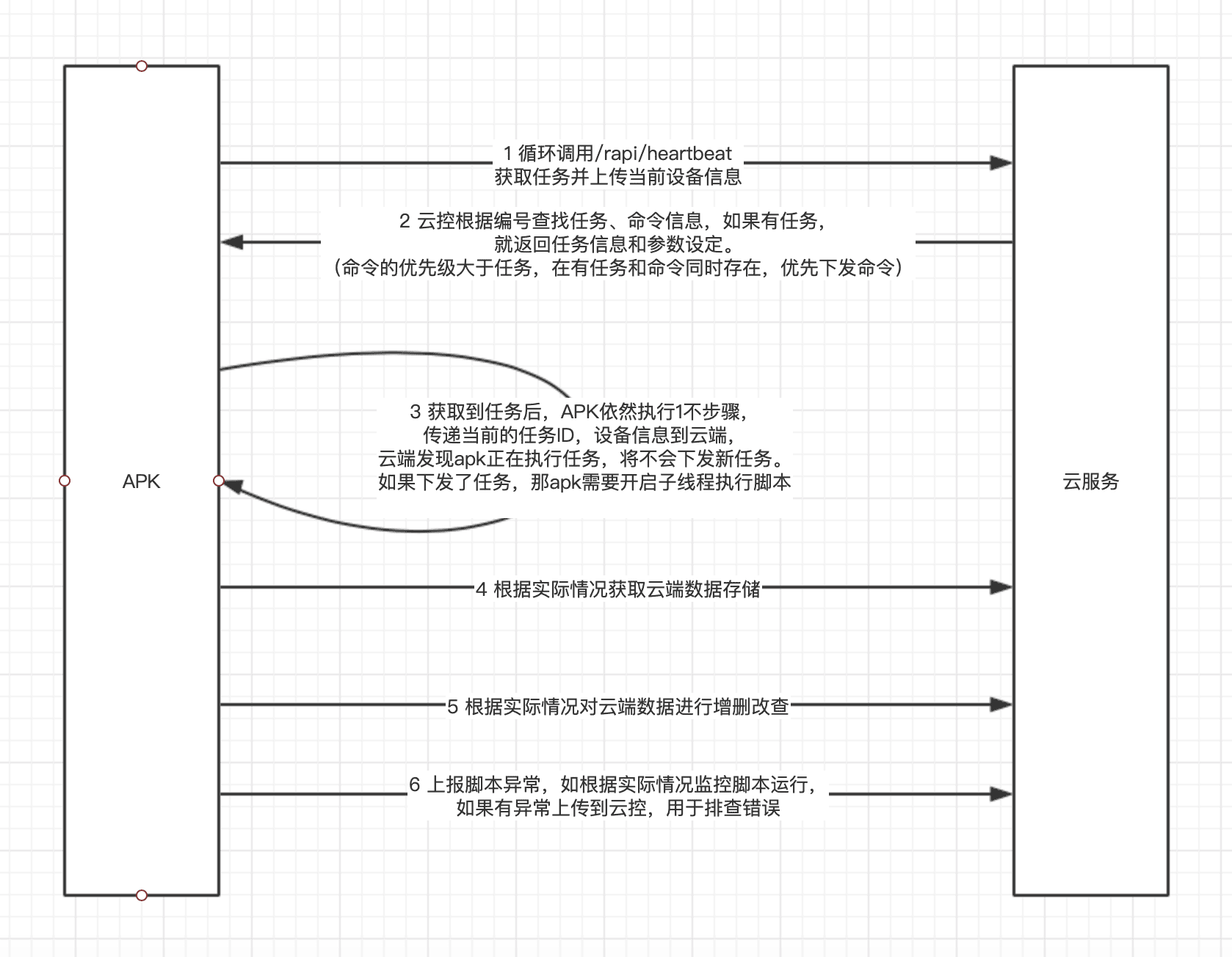
Detailed API reference
- Communication uses HTTP, POST requests, and JSON bodies. Java Jsoup example:
   public static String postJSON(String url, JSONObject jsonObject, int timeout) {

          try {
              Connection.Response response
                      = Jsoup.connect(url)
                      .ignoreHttpErrors(true)
                      .ignoreContentType(true)
                      .maxBodySize(100 * 1024 * 1024)
                      .requestBody(jsonObject.toString())
                      .header("Content-Type", "application/json;charset=UTF-8")
                      .timeout(timeout)
                      .method(Connection.Method.POST)
                      .execute();
              if (response != null) {
                  String s = response.body();

                  return s;
              }
          } catch (IOException e) {

          }
          return null;
      }
Notes
- All request bodies are JSON. The
datafield holds the actual payload: Base64-encode the JSON fordata, then put it in the request. Example:
deviceNo: device ID
{
 "deviceNo":"001",
 "data":"eyJkZXZpY2VObyI6IjAwMSIsImFuZHJvaWRJZCI6IjMzMzY5MzdlNDBmMmE4NDAiLCJicmFuZCI6\nIkhPTk9SIiwibW9kZWwiOiJZQUwtQUw1MCIsIm9zVmVyc2lvbiI6IjEwIiwic2RDYXJkU3BhY2Ui\nOjExODQwNzI5OTA3Miwic2RDYXJkTGVmdFNwYWNlIjozMDIwMjQ0MTcyOCwidG90YWxNZW1vcnki\nOjU5NTAzNDUyMTYsImF2YWlsTWVtb3J5Ijo2NTAyMTEzMjgsImJhdHRlcnkiOjU1LCJiYXR0ZXJ5\nVGVtcCI6MjcsImlzQ2hhcmdpbmciOjEsImJyaWdodG5lc3MiOjY4LCJhcGtWZXJzaW9uIjoiNi45\nLjAiLCJlY1ZlcnNpb24iOiI2LjkuMCIsInJ1bk1vZGUiOiLml6Dpmpznoo0iLCJzZXJ2aWNlT2si\nOjAsImNtZFN1YklkIjoiIiwiYWN0aW9uIjoiaGVhcnRiZWF0In0=\n"
}
After Base64 decode, data is the JSON payload to submit.
2. Unified response format
data: Base64-encoded response payload — decode itcode:0means success; any other value is an errormsg: error message
{
	"code": 0,
	"msg": "",
	"data":"xxxxxx"
}
- The APIs below do not repeat the outer request/response wrapper. Only fields inside the
datapayload are documented.
1. Heartbeat / task info API
- Reports the current task, messages, and device status. Uses the shared wrapper format. Data appears under cloud control → Monitoring & alerts → Device monitoring.
- Three response types: (1) no task or command, (2) one-click command, (3) task — see examples below.
- Endpoint:
http://192.168.0.1:8099/rapi/heartbeat - Method: POST JSON
- Request parameters
data: Base64-encoded JSON payload
  {
   "deviceNo":"001",// device ID
   "data":"eyJkZXZpY2VObyI6IjAwMSIsImFuZHJvaWRJZCI6IjMzMzY5MzdlNDBmMmE4NDAiLCJicmFuZCI6\nIkhPTk9SIiwibW9kZWwiOiJZQUwtQUw1MCIsIm9zVmVyc2lvbiI6IjEwIiwic2RDYXJkU3BhY2Ui\nOjExODQwNzI5OTA3Miwic2RDYXJkTGVmdFNwYWNlIjozMDIwMjQ0MTcyOCwidG90YWxNZW1vcnki\nOjU5NTAzNDUyMTYsImF2YWlsTWVtb3J5Ijo2NTAyMTEzMjgsImJhdHRlcnkiOjU1LCJiYXR0ZXJ5\nVGVtcCI6MjcsImlzQ2hhcmdpbmciOjEsImJyaWdodG5lc3MiOjY4LCJhcGtWZXJzaW9uIjoiNi45\nLjAiLCJlY1ZlcnNpb24iOiI2LjkuMCIsInJ1bk1vZGUiOiLml6Dpmpznoo0iLCJzZXJ2aWNlT2si\nOjAsImNtZFN1YklkIjoiIiwiYWN0aW9uIjoiaGVhcnRiZWF0In0=\n"
  }
- JSON fields in
data
  {
  	"apkVersion": "5.12.0", // packaged APK version; ignore if not using an EC APK
  	"ecVersion": "5.12.0", // EC source version; ignore if not using an EC APK
  	"imei": "123333",// device IMEI; optional
  	"deviceNo": "001",// device ID; required
  	"androidId": "9283223",// Android ID; optional
  	"brand": "HUWEI",// phone brand; optional
  	"model": "A69",// phone model; optional
  	"osVersion": "6.1",// OS version; optional
  	"sdCardSpace": 10240000,// total SD card space; may be 0
  	"sdCardLeftSpace": 1024000,// free SD card space; may be 0
  	"availMemory": 102400000,// available RAM; may be 0
  	"totalMemory": 1024000000,// total RAM; may be 0
  	"battery": 90,// battery level; may be 0; recommended for monitoring
  	"batteryTemp": 30,// battery temperature; may be 0; recommended for monitoring
  	"isCharging": 1,// charging: 1 yes, 0 no
  	"brightness": 100,// screen brightness; may be 0
  	"runMode": "Accessibility",// run mode: proxy or Accessibility; ignore if not using an EC APK
  	"serviceOk": 1,// automation service OK: 1 yes, 0 no; ignore if not using an EC APK
  	"action": "heartbeat",// request type; fixed to heartbeat
  	"taskId": "123",// current task ID; required while a task is running (avoids duplicate dispatch)
  	"taskName": "Test task",// name of the running task
  	"cmdSubId": "",// one-click command ID; required while executing a command
  	"msg":"Opening app",// message shown in cloud control → Device monitoring
    "createTimestamp":1509273923// current time in milliseconds
  }
- Response (no task)
  {
  	"action": "resp"
  }
- Response (one-click command)
  {
  	"action": "where", // command response; values: where — locate device,
  	// inst — install APK, rebphone — reboot phone
  	// stsc — stop script, shellcmd — run shell command
  	// stsc2 — stop script
  	"cmdSubId": "", // command ID
  	"content": "download URL or shell command" // when action=inst, APK download URL
  	// when action=shellcmd, the shell command string
  }
- Response (task)
{
	"action": "task", // task response
	"taskId": "123", // cloud main task ID
	"taskName": "Test task", // cloud main task name
	"scriptId": "123", // cloud script ID
	"scriptName": "Test script", // script name
	"scriptUrl": "http://192.168.0.3:8099/profile/a.js", // script download URL
	"scriptVersion": "1.0", // script version
	"scriptMd5": "xxxxx", // script file MD5 for download verification
	"valueJson": { // task parameters from cloud control → Tasks → Parameter settings
		"x1": "1",
		"x2": "1111",
		"x3": "3xd",
		"x4": "1",
		"aaa": "1",
		"bb": ""
	}
}
2. Get stored data API
-
Purpose: read data stored on cloud control
-
Endpoint:
http://192.168.0.1:8099/rapi/getData -
Method: POST JSON
-
JSON fields in
data
  {
  	"deviceNo":"001",// current device ID
    "groupName":"Data group 1",// data group name
    "dataName":"123455"// unique data key
  }
- Response
  [ // record list
  	{
  		"id": "1", // data ID
  		"name": "xxx", // data name
  		"content": "xxx" // data content
  	}
  ]
3. Upload stored data API
- Purpose: upload data for storage
- Endpoint:
http://192.168.0.1:8099/rapi/addData - Method: POST JSON
- Request parameters (
datapayload):
  {
  	"dataKey":"13",// unique data key
    "groupName":"Data group 1",// data group; created on cloud if missing
    "content":"ddd"// data content
  }
- Response
  {
  	"result": 1// greater than 0 = success; otherwise failure
  }
4. Update stored data API
- Purpose: update stored data
- Endpoint:
http://192.168.0.1:8099/rapi/updateData - Method: POST JSON
- Request parameters (
datapayload):
  {
  	"dataKey":"13",// unique data key
    "groupName":"Data group 1",// data group name
    "content":"ddd"// data content
  }
- Response
  {
  	"result": 1// greater than 0 = success; otherwise failure
  }
5. Delete stored data API
- Purpose: delete stored data
- Endpoint:
http://192.168.0.1:8099/rapi/removeData - Method: POST JSON
- Request parameters (
datapayload):
  {
  	"dataKey":"13",// unique data key
    "groupName":"Data group 1"// data group name
  }
- Response
  {
  	"result": 1// greater than 0 = success; otherwise failure
  }
6. Append one data line API
- Purpose: append a line to stored data
- Endpoint:
http://192.168.0.1:8099/rapi/appendOneLineData - Method: POST JSON
- Request parameters (
datapayload):
  {
    "dataKey":"13",// unique data key
    "groupName":"Data group 1",// data group name
    "content":"ddd"// data content
  }
- Response
  {
  	"result": 1// greater than 0 = success; otherwise failure
  }
6. Delete one data line API
- Purpose: delete one line from stored data
- Endpoint:
http://192.168.0.1:8099/rapi/removeOneLineData - Method: POST JSON
- Request parameters (
datapayload):
  {
  	"dataKey":"13",// unique data key
    "groupName":"Data group 1",// data group name
    "content":"ddd"// data content
  }
- Response
  {
  	"result": 1// greater than 0 = success; otherwise failure
  }
6. Report script exception API
- Purpose: upload script errors for troubleshooting; shown under cloud control → Reports → Exception logs
- Endpoint:
http://192.168.0.1:8099/rapi/reportExc - Method: POST JSON
- Request parameters (
datapayload):
  {

    "deviceNo":"001",// device ID
    "scriptName":"Test 1",// script name
    "content":"Script exception details",// exception content
    "apkVersion":"1.2",// APK version
    "scriptVersion":"1.0"// script version
  }
- Response
  {
  }
7. Report command execution log API
- Purpose: upload steps and results when a cloud control one-click command runs on the device; shown under cloud control → One-click commands → Details
- Endpoint:
http://192.168.0.1:8099/rapi/httpCmdLog - Method: POST JSON
- Request parameters (
datapayload):
  {

    "deviceNo":"001",// device ID
    "cmdSubId":"123",// command sub-ID
    "msg":"Execution succeeded",// message
    "createTimestamp":1509273923// current time in milliseconds
  }
- Response
  {
  }