Technical solution selection
Technical solution selection
Want to match by use case quickly? Try the interactive assistant: Tech selector
/selector. Or see the full product lineup: All products/products.
iOS solution selection overview
The diagram below shows the overall selection path for iOS options — use it as a reference:
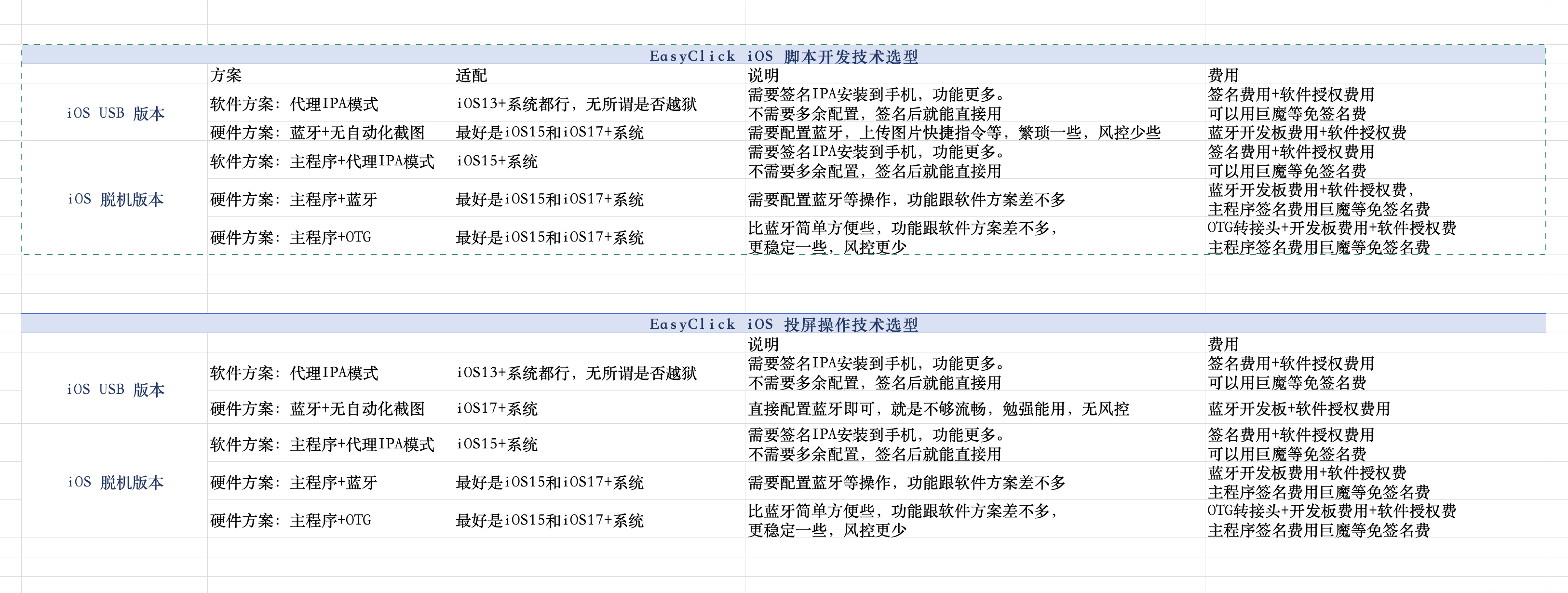
iOS script development — tech selection
iOS USB edition
| Solution type | System requirements | Cost | Advantages | Notes |
|---|---|---|---|---|
| Software: standalone main-app mode | iOS 15+, no jailbreak | IPA signing fee + software license (TrollStore can avoid signing fees) | Full feature set; use directly after signing; custom IME supported; game consoles supported; free personal Apple ID signing via i4Tools/sideloadly also works | — |
| Software: proxy IPA mode | iOS 13+, no jailbreak | IPA signing fee + software license (TrollStore can avoid signing fees) | Rich features; use directly after signing; no extra setup | — |
| Software: AI Agent | Control Center 10.1.0+; PC required | USB device license + LLM tokens (chat/authoring) Running workflows does not consume chat tokens | Little or no code: Chinese chat, drag-and-drop workflows, multi-device batch | Requires USB device license (not screen license); configure proxy IPA or BLE/OTG per steps → AI Agent handbook |
| USB HID (no dev board) | iOS 17+ No jailbreak | Software license (no BLE / OTG board) | Control over USB only; lower risk control; no-app path available | Scene mode: No automation screenshot + USB_HID, or Main-app recording + USB_HID (needs offline main IPA; system first shows a captured screen, then opens the main app and a live-broadcast dialog — tap Start Broadcast) → USB HID events | Beginner install |
| Hardware: Bluetooth + non-automation screenshots | iOS 17+ No jailbreak | BLE dev board + software license | Lower risk control | Requires BLE setup, upload-image Shortcuts, etc.; more tedious → USB BLE tutorial |
| Hardware: OTG + non-automation screenshots | iOS 17+ No jailbreak | OTG dev board + adapter + software license | No signal interference; lower risk control | Requires upload-image Shortcuts, etc.; more tedious → USB OTG-HID tutorial |
Pick a path by target app (heuristic, same as Android)
- When risk control matters more: hardware is usually best — lowest risk control. On iOS USB, USB HID is also a good first choice (no dev board, iOS 17+); when hardware is needed, prefer BLE; USB OTG setup is tedious and not recommended; when OTG is needed, prefer standalone + OTG/BLE.
- Overseas apps (TikTok / Facebook / Instagram, etc.): try proxy IPA or AI Agent first; switch to hardware if risk control tightens (same: USB → BLE; OTG → standalone combo). Not sure? Use the interactive selector: Tech selector
/selector.
iOS standalone edition
| Solution type | System requirements | Cost | Advantages | Notes |
|---|---|---|---|---|
| Software: main app | iOS 15+ | Signing fee + software license (TrollStore can avoid signing fees) | Single-app setup; fast; only one IPA to sign | — |
| Software: main app + proxy IPA mode | iOS 15+ | Signing fee + software license (TrollStore can avoid signing fees) | Two apps in separate processes; auto-recovery if automation service dies; supports unattended operation | — |
| Hardware: main app + BLE | iOS 17+ | BLE dev board + software license (main app signing can use TrollStore to avoid fees) | Comparable to software options | → BLE getting started |
| Hardware: main app + OTG | iOS 17+ | OTG adapter + dev board + software license (main app signing can use TrollStore to avoid fees) | Simpler and more stable than BLE; lower risk control | → OTG HID getting started |
iOS screen mirroring — tech selection
iOS USB edition
→ See iOS USB screen mirroring tutorial
| Solution type | System requirements | Cost | Advantages | Notes |
|---|---|---|---|---|
| Software: proxy IPA mode | iOS 13+, no jailbreak | IPA signing fee + software license (TrollStore can avoid signing fees) | Use directly after signing; no extra setup | — |
| USB HID (no dev board) | iOS 17+ | Software license (no BLE / OTG board) | No extra hardware; lower risk control; main-app recording is smoother | System settings → Scene mode: No automation screenshot + USB_HID or Main-app recording + USB_HID. With main-app recording, the system first shows a captured screen, then opens the main app and a live-broadcast dialog — tap Start Broadcast → New UI mirroring guide |
| Hardware: Bluetooth | iOS 17+ | BLE dev board + software license | No risk control issues | Fair smoothness; barely usable |
iOS standalone edition
→ See iOS standalone wireless control-center screen mirroring
| Solution type | System requirements | Cost | Advantages | Notes |
|---|---|---|---|---|
| Software: main app + proxy IPA mode | iOS 15+ | IPA signing fee + software license (TrollStore can avoid signing fees) | Use directly after signing; no extra setup | — |
| Hardware: main app + BLE | iOS 17+ | BLE dev board + software license (main app signing can use TrollStore to avoid fees) | Comparable to software options | — |
| Hardware: main app + OTG | iOS 17+ | OTG adapter + dev board + software license (main app signing can use TrollStore to avoid fees) | Simpler and more stable than BLE; lower risk control | — |
Android tech selection
Android offers six run modes — pick as needed:
Mode overview
| Mode | Activation | Best for |
|---|---|---|
| Accessibility mode | Enable system Accessibility service | General automation; lowest barrier |
| Proxy mode | IDEA activation / activator activation / wireless debugging activation / Shizuku activation, etc. (USB debugging required) | No root; fullest features; recommended default |
| Root mode | Rooted device | System-level Shell operations |
| USB-HID mode | PC runs HID control center + USB cable | PC-direct control; large-scale multi-device |
| BLE mode | ESP32 BLE dev board | Hardware path when Accessibility cannot be enabled |
| OTG HID mode | ESP32 dev board + OTG adapter | Most portable hardware; no PC needed |
Pick a path by target app (heuristic)
- When risk control matters more: HID (OTG / BLE / USB-HID) is usually best — lowest risk control.
- Overseas apps (TikTok / Facebook / Instagram, etc.): try proxy mode first; switch to HID if risk control tightens. Not sure? Use the interactive selector: Tech selector
/selector.
Feature compatibility quick reference
| Feature | Accessibility | Proxy | Root | USB-HID | BLE | OTG HID |
|---|---|---|---|---|---|---|
| Node selector | ✅ | ✅ | ❌ | ❌ | ❌ | ❌ |
| Image/color recognition | ✅ | ✅ | ✅ | ✅ | ✅ | ✅ |
| OCR | ✅ | ✅ | ✅ | ✅ | ✅ | ✅ |
| YOLO detection | ✅ | ✅ | ✅ | ✅ | ✅ | ✅ |
| Shell commands (normal) | ✅ | ✅ | ✅ | ✅ | ✅ | ✅ |
| Shell commands (elevated) | ❌ | ✅ | ✅ | ❌ | ❌ | ❌ |
| System keys | ✅ | ✅ | ✅ | ✅ | ✅ | ✅ |
Mode details
Accessibility mode
| Item | Details |
|---|---|
| System requirements | Android 5.0+, no root |
| Hardware | None |
| Cost | Packaging membership only |
| Advantages | Lowest barrier — enable Accessibility and go; supports node selector |
| Limitations | Screenshots need explicit permission; fewer features than proxy mode |
| Docs | Accessibility event API |
Proxy mode (recommended default)
| Item | Details |
|---|---|
| System requirements | Android 5.0+, USB debugging, no root |
| Hardware | None (PC needed for first activation) |
| Cost | Packaging membership only |
| Advantages | Fullest features; screenshots without per-use permission; Shell commands; IME control; runs with screen off |
| Limitations | First activation needs PC; after USB disconnect, configure ADB WiFi to stay active |
| Docs | Proxy event API | Device activation |
Root mode
| Item | Details |
|---|---|
| System requirements | Android 5.0+, rooted |
| Hardware | None |
| Cost | Packaging membership only |
| Advantages | Arbitrary Shell commands; strong system-level control |
| Limitations | No node selector; requires root |
| Docs | Shell command API |
USB-HID mode
| Item | Details |
|---|---|
| System requirements | Android 5.0+, no root |
| Hardware | PC (Windows/Linux); USB cable; optional HID mini host (v3.0.0+, driverless) |
| Cost | HID hardware (optional) + packaging membership |
| Advantages | PC controls phone over USB — stable; multi-host networking for large-scale control |
| Limitations | No node selector; Windows needs libusbK/WinUSB (v4.0.0+ supports WinUSB); PC must stay connected |
| Docs | HID event API | USB-HID hardware guide |
BLE mode
| Item | Details |
|---|---|
| System requirements | Android 5.0+, no root |
| Hardware | ESP32-S3 or ESP32-C3 dev board |
| Cost | BLE dev board (low tens of CNY) + packaging membership |
| Advantages | Wireless; lower risk control; no signal interference |
| Limitations | No node selector; BLE pairing; location/floating-window permissions |
| Docs | BLE event API | BLE hardware guide |
OTG HID mode
| Item | Details |
|---|---|
| System requirements | Android 5.0+, OTG support, no root |
| Hardware | ESP32-S2 or ESP32-S3; OTG adapter/cable (3-in-1 with charging recommended) |
| Cost | OTG dev board (low tens of CNY) + adapter + packaging membership |
| Advantages | Most portable; no PC or network; lowest risk control; more stable than BLE |
| Limitations | No node selector; first use needs USB accessory authorization on phone |
| Docs | OTG event API | OTG HID hardware guide |
Android screen mirroring — tech selection
Android mirroring has screen data transfer and tap injection — combine freely. Screen data goes over USB or WiFi/network; taps use software (ADB / Accessibility / proxy) or hardware (HID).
First 10 devices free; extra devices need license codes. See Enterprise Android control-center mirroring.
Software options
| Option | Screen transfer | Tap injection | System/network | Hardware | Stability |
|---|---|---|---|---|---|
| USB ADB mirroring | USB cable | ADB | USB debugging required | USB cable | Highest |
| ADB WiFi mirroring | WiFi (LAN) | ADB | Network debugging after first USB pair | None | High |
| LAN WiFi mirroring | WiFi (LAN) | Accessibility / proxy | EC APK installed; same LAN | None | High |
| WAN mirroring | Internet | Accessibility / proxy | Public IP (port forward) or cloud tunnel | Cloud server (optional) | Network-dependent |
Hardware options (HID)
HID tap injection — no Accessibility, no USB debugging — lower risk control. Screen data still over WiFi.
| Option | Screen transfer | Tap injection | Hardware | Cost per device | Notes |
|---|---|---|---|---|---|
| USB-HID mirroring | WiFi / Internet | USB HID host | PC or mini host (e.g. Centerm C92) | ~¥150/device (up to 20 phones) | Large-scale control; multi-host networking |
| BLE HID mirroring | WiFi | BLE HID | ESP32-S3 / C3 | Low tens of CNY | Wireless; no signal interference |
| OTG HID mirroring | WiFi | OTG USB HID | ESP32-S2 / S3 + OTG adapter | Low tens of CNY + adapter | Simplest setup; fastest response; no PC |
→ See Control-center mirroring | HID Linux host | USB-HID guide | BLE guide | OTG guide
HarmonyOS Next solution selection
HarmonyOS Next uses control-center connection (nothing installed on device; risk-friendly). PC and phone connect via USB wired or WiFi wireless debugging — cable not required at all times. Current options:
| Solution type | System / environment | Cost | Advantages | Notes |
|---|---|---|---|---|
| Default (USB wired / WiFi wireless) | HarmonyOS Next; PC and phone on same network or USB | Per docs and licensing | No on-device install; wired debugging, or enable wireless debugging and unplug | Enable wireless debugging in Developer options; center Scan wireless devices with IP:port; or USB first, then Enable wireless debugging and switch to wireless → Connect phone (USB / wireless) | HarmonyOS docs home |
| Hardware: USB BLE | HarmonyOS Next USB center 3.2.0+; ESP32-C3 / S3 dev board | BLE dev board (self-purchase) + software licensing | BLE HID injection; combine or use alone with HDC automation / mirroring / USB HID | Flash HarmonyOS USB BLE firmware (not iOS firmware); center binds UDID ↔ bleMac then pair on phone; dev board can also use serial or WiFi → BLE tutorial | BLE event API |
Selection tips
- Most workloads: default connection (USB or WiFi wireless debugging) is enough.
- For flexible hardware taps / key injection, or combining with existing HID: USB BLE. Not sure? Use the interactive selector: Tech selector
/selector.